Best Video Review Software (2026)
Kreatli, Frame.io, Filestage, Ziflow, Wipster, Dropbox Replay, PageProof and GoVisually, compared on guest review, approvals, Premiere Pro support and what a 5-person team pays each month.
Short answer
The best video review software depends on who gives feedback and where your editors work. Frame.io fits editors in Premiere Pro. Ziflow and Wipster fit multi-step approvals. Kreatli fits teams that review video, images, PDFs and audio with clients in one project. For a team of 5, list prices run from $75 a month (Frame.io Pro) to $299 (Ziflow Standard).
Which is the best video review software for your team?
Start from the situation you're in. Each pick below comes from the vendor's own pages.
- Your clients won’t create an account. Kreatli guests comment from a link after typing their name. Frame.io share reviewers, Filestage and Wipster reviewers can also comment without an account. Ziflow’s Secure Guest Reviewing is Enterprise only.
- Your editors live in Premiere Pro. Frame.io is the closest fit: its V4 panel is built into Premiere Pro 25.6 and later. Wipster, Dropbox Replay and Filestage also list Premiere Pro integrations. Kreatli has no editing-software panels.
- You need multi-step approvals. Ziflow routes proofs through workflow stages (2 on Standard, 3 on Pro). Wipster sets up multi-step approvals with an audit trail. Kreatli has custom approval statuses, but it doesn’t move files from stage to stage.
- You want to start free. Kreatli Exploration mode gives you 1 project, 2 files, no credit card. Frame.io Free allows 2 members and 2 projects. Filestage Free allows 1 active project. Ziflow Free covers 2 seats and 1 workflow stage. Wipster, PageProof and GoVisually have no free plan.
- Your team is big and you want one price. PageProof Team is a flat $249 a month for your team. Ziflow Standard includes 15 seats. Frame.io stops at 15 members before Enterprise pricing.
- Your files already live in Dropbox. Dropbox Replay adds review to Dropbox Plus or higher as a paid add-on.
How we compared the tools
Each tool is described with the same five criteria, using the vendor's own pages:
- File types: video only, or also images, PDFs, audio and documents.
- Guest review: whether clients can comment without an account or a paid seat.
- Approvals: statuses, sign-off steps, due dates or reminders.
- Editing-software integrations: panels for Premiere Pro, Final Cut Pro, After Effects or DaVinci Resolve.
- Pricing: per seat or flat, the free plan, and the monthly cost for a 5-person team on the cheapest listed plan that reviews video.
Pricing for a 5-person team
Costs are month-to-month list prices before tax, for 5 seats on the cheapest listed plan that reviews video. Annual billing is cheaper where offered. Free plans are left out because of their limits.
| Tool | Pricing model | Starting price | Free plan | 5 seats / month | How it's calculated |
|---|---|---|---|---|---|
| Kreatli | Per seat | $14 per seat/month (Creator) | Yes (Exploration: 1 project, 2 files, no credit card) | $145 (Team) | Team: 5 × $29 per seat. Billed monthly. |
| Frame.io | Per seat | $15 per seat/month (Pro) | Yes | $75 (Pro) | Pro: 5 × $15 per seat. |
| Filestage | Flat price | €249/month flat (Starter) | Yes | €249 (Starter) | Starter: flat €249, includes 10 seats. |
| Ziflow | Flat price | $299/month flat (Standard) | Yes | $299 (Standard) | Standard: flat $299, includes 15 seats. |
| Wipster | Per seat | $11.95/month flat (Light) | No | $125 (Team) | Team: 5 × $25 per seat. |
| Dropbox Replay | Per-user add-on | Check vendor | Limited | Check vendor | EU pricing page: €11 per user/month (€9 billed annually). Check Dropbox for pricing in your region |
| PageProof | Flat price | $249/month flat (Team) | No | $249 (Team) | Team: flat $249. |
| GoVisually | Per seat | $16 per seat/month (Lite, no video) | No | $165 (Pro) | Pro: 5 × $33 per seat. |
Verified Nov 27, 2026against Frame.io pricing
- Filestage prices are in EUR and are not converted.
- Dropbox Replay is shown with its EU price only; its USD price could not be confirmed on the US page.
The 8 tools in detail
Kreatli is first because it's our product. Below is a real review in Kreatli: a team member and two guest reviewers left comments, each pinned to a timecode, with drawn markup on the frame.
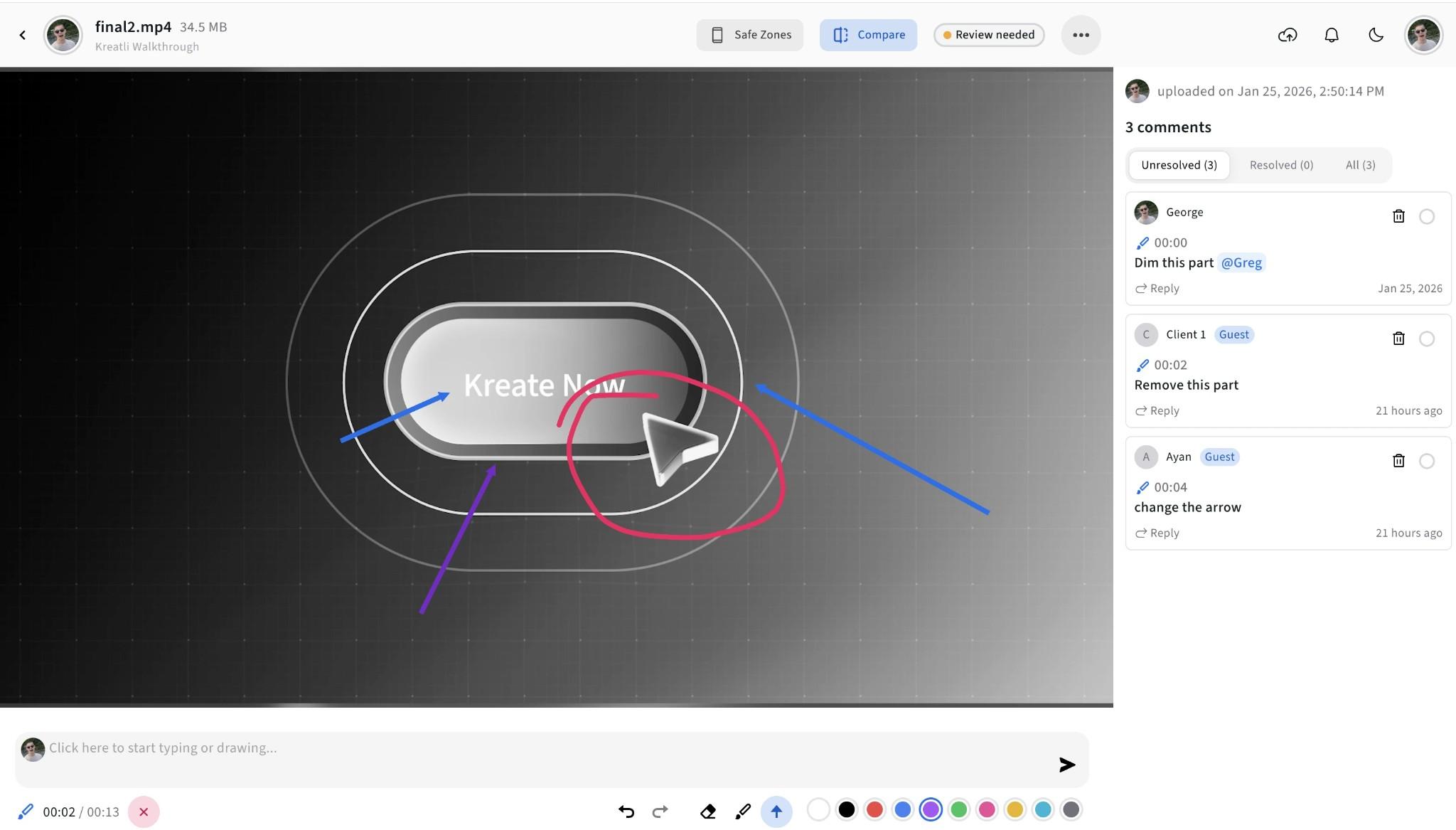
See how this works on commenting on video in Kreatli.
1. Kreatli
Best for: Creative teams that review video, images, PDFs and audio with clients and run tasks in the same place.
Strengths
- Timecoded and time-range comments, drawn markup and PDF page comments.
- Guest review without login (name only), on every plan.
- Custom approval statuses that guests can see on the shared link.
- Version stacks and side-by-side version compare.
- Tasks, deliverables and chat alongside the review.
Limits
- No comment export (CSV, PDF or editing-software markers).
- No panels or plugins for Premiere Pro, Final Cut Pro or DaVinci Resolve.
- No website proofing and no frame-by-frame stepping.
- Listed plans go up to 10 members; larger teams are on Enterprise (custom pricing).
Pricing: From $14 per seat/month (Creator). 5 seats: $145 (Team).
Sources: Kreatli pricing
2. Frame.io
Best for: Video editors in Adobe tools who want review inside Premiere Pro and After Effects.
Strengths
- The Frame.io V4 panel is built into Premiere Pro 25.6 and later. After Effects, Lightroom, LumaFusion and Baselight integrations too.
- Reviews video, images, documents and Office files.
- Share reviewers can comment without an account.
- Comment export to CSV or plain text for editing software, and Print Comments to PDF.
Limits
- Priced per member; more than 15 members means Enterprise with custom pricing.
- Free plan: 2 members, 2GB storage and 2 projects.
- Frame.io says DaVinci Resolve is not supported in V4; Resolve users import comments as an EDL.
Pricing: From $15 per seat/month (Pro). 5 seats: $75 (Pro). Full Frame.io pricing breakdown
Sources: Frame.io pricing, Frame.io help: plan limits, Frame.io integrations, Frame.io help: Premiere V4 panel, Frame.io help: updating to V4, Frame.io help: comment exporting
3. Filestage
Best for: Marketing teams and agencies proofing many formats, including live websites, on a flat price.
Strengths
- Reviews video, images, designs, documents, live websites, HTML and audio.
- Approval status tracking, due dates and reminders.
- Unlimited reviewers, no account needed.
- Integrations with Premiere Pro, After Effects and InDesign.
Limits
- Priced in EUR.
- 10 seats on every plan; extra seat packs are not priced on the pricing page.
- Free plan: 1 active project and 5 new files per month.
Pricing: From €249/month flat (Starter). 5 seats: €249 (Starter). Full Filestage pricing breakdown
Sources: Filestage pricing, Filestage, Filestage integrations
4. Ziflow
Best for: Larger review teams that want many seats included in one flat price.
Strengths
- Standard includes 15 seats and Pro includes 20 seats for one flat price.
- Workflow stages for multi-step approvals: 2 on Standard, 3 on Pro.
- Unlimited reviewers on every plan.
- A free-forever plan for 2 seats.
Limits
- The headline prices are billed annually; month to month costs more.
- Secure Guest Reviewing is Enterprise only.
- Free plan: 1 workflow stage and 60-day history.
Pricing: From $299/month flat (Standard). 5 seats: $299 (Standard). Full Ziflow pricing breakdown
Sources: Ziflow pricing
5. Wipster
Best for: Video teams that want editing-software panels and multi-step approvals.
Strengths
- A review panel for Premiere Pro and Final Cut Pro.
- Multi-step approvals with an audit trail and one-click sign-off.
- Reviews video, images, PDF and audio; free, unlimited guest reviewers.
Limits
- No free plan on its pricing page.
- SSO is Enterprise only.
- Team storage starts at 250GB.
Pricing: From $11.95/month flat (Light). 5 seats: $125 (Team). Full Wipster pricing breakdown
Sources: Wipster pricing, Wipster
6. Dropbox Replay
Best for: Teams already paying for Dropbox Plus or higher that want review without another app.
Strengths
- Reviews video, image and audio projects.
- Integrations with Premiere Pro, Final Cut Pro, DaVinci Resolve, After Effects, Pro Tools and LumaFusion.
- Reviewers can comment without a Dropbox account.
Limits
- An add-on: you also pay for the Dropbox plan, and it is not available on Family plans.
- Without the add-on you get 4 or 10 file uploads, depending on the plan.
Pricing: EU pricing page: €11 per user/month (€9 billed annually). Check Dropbox for pricing in your region
Sources: Dropbox Replay, Dropbox help: Replay add-on, Dropbox help: Replay
7. PageProof
Best for: Teams that want one flat monthly price with unlimited reviewers, proofs and storage.
Strengths
- Flat-rate pricing for the team, with unlimited reviewers, proofs and storage.
- Proofs for video, audio, websites, HTML and more.
- SSO from the Team Plus plan.
Limits
- No free plan; trial on request.
- The cheapest plan is $249 per month, whatever the team size.
Pricing: From $249/month flat (Team). 5 seats: $249 (Team).
Sources: PageProof pricing
8. GoVisually
Best for: Teams reviewing design files and artwork, including CPG brands that need its compliance suite.
Strengths
- Pro includes unlimited reviewers.
- Trial without a credit card.
Limits
- The Lite plan has no video review, 15 active projects and up to 15 external reviewers.
- Pro bills a minimum of 3 users; no free plan.
Pricing: From $16 per seat/month (Lite, no video). 5 seats: $165 (Pro).
Sources: GoVisually pricing
When Kreatli is not the right choice
Pick another tool when one of these matters more than mixed-media client review:
- You want review inside your editing software. Kreatli has no Premiere Pro, Final Cut Pro or DaVinci Resolve panels. Frame.io, Wipster and Dropbox Replay all integrate with Premiere Pro.
- You need to export comments. Kreatli doesn't export comments. Frame.io exports CSV and plain text for editing software and prints comments to PDF.
- You proof live websites or HTML. Kreatli has no website proofing; Filestage does.
- You need frame-by-frame stepping. Kreatli comments are timecoded, but there is no frame stepping.
- Your team is larger than 10 and you want a listed price. Kreatli above 10 members is Enterprise with custom pricing. PageProof charges one flat rate for the team, and Wipster Team has no user limit.
- Everything already lives in Dropbox. If you're on Dropbox Plus or higher, the Replay add-on keeps review next to your files.
If none of these apply, test Kreatli's video review software on one real client round. Plans are on the pricing page, or you can start a 7-day trial.
Head-to-head comparisons of the tools above:
Sources
Official vendor pages used for this comparison:
- Kreatli pricing
- Frame.io pricing
- Frame.io help: plan limits
- Frame.io integrations
- Frame.io help: Premiere V4 panel
- Frame.io help: updating to V4
- Frame.io help: comment exporting
- Filestage pricing
- Filestage
- Filestage integrations
- Ziflow pricing
- Wipster pricing
- Wipster
- Dropbox Replay
- Dropbox help: Replay add-on
- Dropbox help: Replay
- PageProof pricing
- GoVisually pricing
FAQ: video review software
What is the best video review software?
It depends on who reviews and where your editors work. Frame.io suits editors in Premiere Pro, Filestage suits teams proofing many formats including websites, Ziflow and Wipster suit multi-step approvals, and Dropbox Replay suits teams already on Dropbox. Kreatli suits creative teams that review video, images, PDFs and audio with clients and want tasks and deliverables in the same project.
Which video review software is cheapest for a team of 5?
Based on each vendor's listed prices (checked Nov 27, 2026), the monthly cost for 5 seats on a plan that reviews video, paying month to month, is: Frame.io $75 (Pro), Wipster $125 (Team), Kreatli $145 (Team), GoVisually $165 (Pro), PageProof $249 (Team), Ziflow $299 (Standard), Filestage €249 (Starter, billed in EUR). Annual billing lowers several of these. Dropbox Replay is left out because its US price wasn't confirmed on its US pricing page.
Can clients review videos without creating an account?
Yes, in most of these tools. Kreatli guests comment from a link with just their name, Frame.io share reviewers comment without an account, Filestage and Wipster offer unlimited reviewers without accounts, and Dropbox Replay reviewers don’t need a Dropbox account. Ziflow lists unlimited reviewers, but its Secure Guest Reviewing feature is Enterprise only.
Which video review tools integrate with Premiere Pro?
Frame.io (its V4 panel is built into Premiere Pro 25.6 and later), Filestage, Wipster and Dropbox Replay all list Premiere Pro integrations. Kreatli has no editing-software panels: you upload an export and share a review link.
Does Kreatli have a free plan?
Kreatli's Exploration mode is free: 1 project, 2 files, no credit card. Paid plans start with a 7-day trial: Creator is $14 per user per month for up to 3 members, and Team is $29 per user per month for up to 10 members.
How were these tools compared?
We compared the file types each tool reviews, guest review, approvals, editing-software integrations and pricing, using each vendor's official pages checked on Nov 27, 2026. Kreatli is our product, so we list what it can't do as well as what it can. Prices change, so confirm on the vendor's site before you buy.
Try Kreatli's video review software
Upload a cut, share a guest review link and collect timecoded comments. Explore free, no credit card.