How to Watch Crunchyroll Together With Friends or a Team
A weekly simulcast with friends and a reference session for an animation team need the same thing: one episode, in sync.
Article summary
Crunchyroll has no watch party button. Here is how friends and animation teams watch an episode in sync, which tools work, and how to run a bigger group.
To watch Crunchyroll together, each person opens the same episode on their own account and a Chrome extension keeps the players in sync. Crunchyroll has no watch party button of its own, and a Discord screen share usually shows a black screen.
Most people who search for this want a weekly anime night with friends in other cities. Animation and motion teams want it too, for a different reason. Watching a well made episode together is one of the fastest ways to agree on timing, staging and style before a project starts. The setup is the same for both.
Key takeaways
- Crunchyroll has no built-in watch party as of 2026. An extension on each person’s tab does the job.
- Everyone needs their own Crunchyroll account. Sync tools line up players and send no video.
- For groups, pick one host, share one invite link and agree on a spoiler rule first.
Does Crunchyroll Have a Watch Party?
No. As of 2026, Crunchyroll has no watch party, watch together or group watch feature. The tools people use are browser extensions made by other companies. Each one sits on top of the Crunchyroll player, creates a shared room, and keeps play, pause and seeking aligned.
Screen sharing is the workaround most people try first. It fails for the same reason it fails on Netflix: the video is protected, so the people on the call often see black. Even when it works, a call compresses the picture, which is a real loss with animation. Line work and fast action cuts are the first things to smear.
How to Set Up a Crunchyroll Watch Party
These steps use AniDachi, which was built for Crunchyroll first. Its guide to a Crunchyroll watch party has the full walkthrough and fixes for common sync problems.
Install AniDachi from the Chrome Web Store, in desktop Chrome.
Open a Crunchyroll episode. The extension detects the player on its own.
Choose Create room and share the invite link.
Friends open the same episode on their own accounts and join. Playback stays in sync from there.
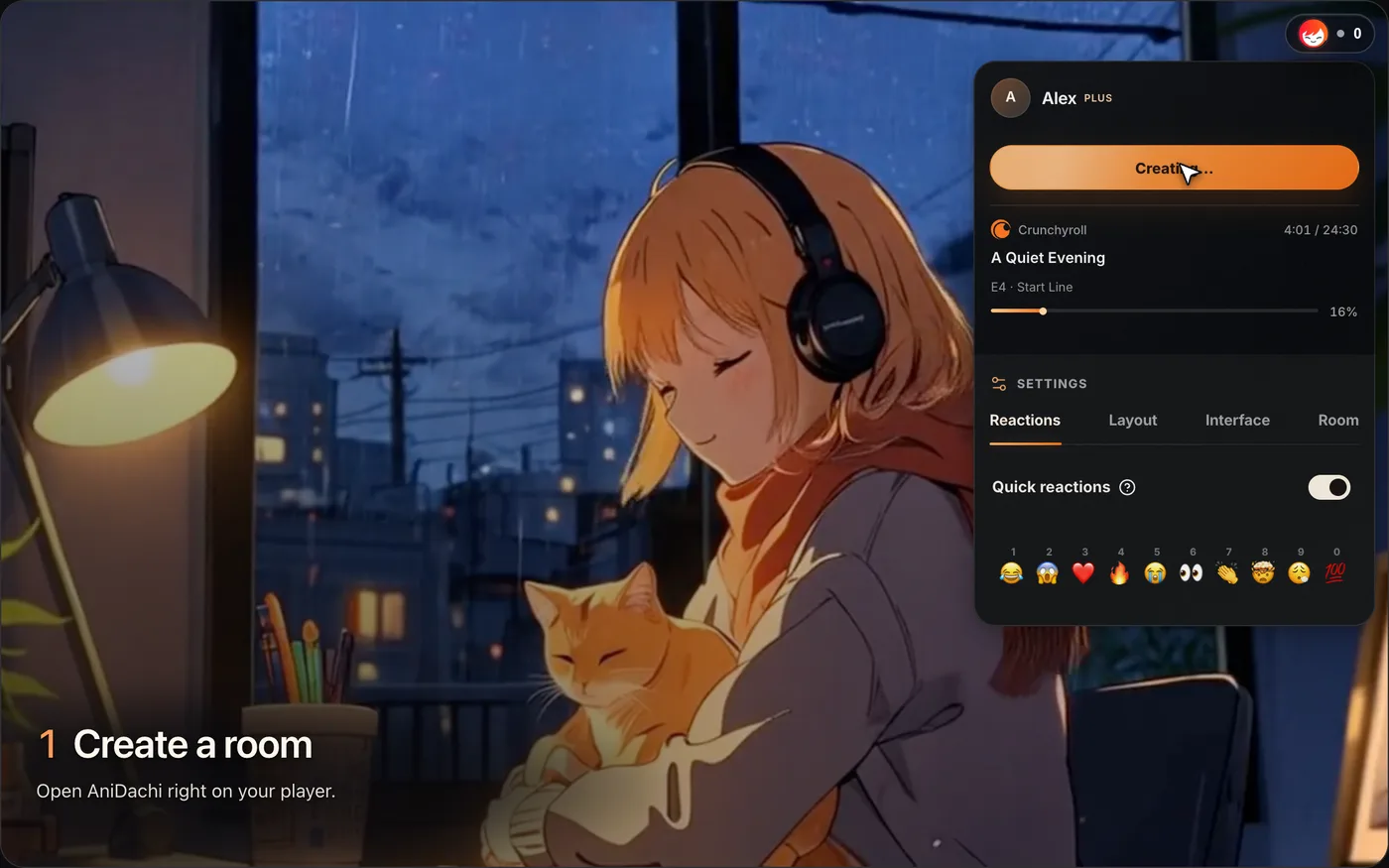
Chat, reactions, cameras and microphones sit on top of the player, so nobody needs a second app open to talk. The room is live. Chat does not hide spoilers, and a catch-up mode for people who watch later is planned but not available yet.
The Main Options Compared
AniDachi. Synced playback with chat, voice and cameras on the player. Free covers 20 minutes a day for up to 4 people. Paid plans remove the daily limit. It also works on Netflix and YouTube.
Crunchyroll Party. A free extension for live sync and chat on Crunchyroll only.
Teleparty. Lists Crunchyroll among many services. Sync and text chat are free, and voice and video are part of its paid tier.
Discord. Good for voice. As a way to show the episode it is a screen share, with the black screen problem above.
Watch2Gether. Works for public video links. It is not a way to watch licensed Crunchyroll episodes from your account.
A common setup is Discord for voice plus a sync extension for the video. If you would rather keep everything in one place, AniDachi has voice and cameras built into the room.
Does Everyone Need a Crunchyroll Account?
Yes. Each person streams the episode from their own Crunchyroll account. Crunchyroll's terms limit an account to one household, and its plans limit how many streams can run at once, so one shared login is not a reliable way to run a party.
The extension is a separate cost. With AniDachi, friends join a room on a free account, and the host's plan sets the room size: 4 people on Free, 6 on Plus and 15 on Pro, including the host.
Tips for Bigger Groups
Past three people, the logistics matter more than the tool.
Pick the night from the release schedule. New episodes land on set days, and dubs follow later. Decide up front whether the group watches subbed or dubbed.
Share one invite link. Post it in the group chat once, so nobody sets up a second room by mistake.
Set a spoiler rule before episode one. Agree on whether you pause to react or talk at the end.
Plan for the person who misses a week. Live rooms need everyone online together. Let them catch up alone before the next session.
Check the episode number out loud. It is the most common cause of a room that will not sync.
For Animation Teams: Reference Sessions
A reference session works best when it is short and has a question attached. Pick one episode or one sequence. Tell the team what to watch for: how long a hold lasts before a cut, how a fight is staged, how much the camera moves. Have the host pause at those moments and talk on voice.
Write the conclusions down somewhere that lasts. Room chat is live and is not a record of decisions. A short list of timestamps and notes in your project brief is enough.
Then keep the two jobs apart. A watch party is for finished shows on a streaming service. Your own shots and animatics need a review tool, where each note is tied to a moment and stays with the file. In Kreatli, reviewers leave timecoded comments on each version, and guests can comment from a link without an account. If generated footage is part of your pipeline, our guide to keeping characters consistent across AI tools covers the style side.
The same setup works on other services. See how to watch Netflix together remotely and what replaced Prime Video Watch Party.
Disclosure: AniDachi and Kreatli share a founder. AniDachi details were checked against its own pages on 14 November 2026. Neither product is affiliated with Crunchyroll, Teleparty or Discord.
Frequently asked questions
Reviewing your own shots instead?
Share a link, collect timecoded comments from clients and teammates, and keep every version in one place.