How to Compare PDF Files (Fast + Accurate Guide)
Learn how to compare PDF files for changes, revisions, and approvals. Best tools, methods, and workflows for teams handling reviews fast.
Article summary
Learn how to compare PDF files for changes, revisions, and approvals. Best tools, methods, and workflows for teams handling reviews fast.
Comparing PDF files sounds simple - until you’re dealing with multiple revisions, client feedback, missing edits, and version confusion.
Whether you’re reviewing contracts, design drafts, storyboards, or production documents, knowing how to compare PDF files properly can save hours of manual checking and prevent costly mistakes.
In this guide, we’ll break down the best ways to compare PDFs, the tools that work best, and how creative teams streamline approvals without juggling endless file versions.
Why Comparing PDF Files Matters
PDFs are often treated as “final.”
But in reality, they’re constantly updated:
New contract clauses
Revised production schedules
Updated shot lists
Client-marked changes
Design iterations
Without comparison, teams risk:
Missing critical edits
Approving outdated versions
Losing track of feedback
Slowing down delivery
That’s why PDF comparison is essential for any review workflow.
The Main Ways to Compare PDF Files
There are three core approaches:
1. Manual Side-by-Side Review
Open both PDFs in separate windows and visually scan.
Works for: small documents
Fails for: long files, tiny edits, fast-paced teams
2. Automated PDF Comparison Tools
These tools detect changes automatically.
They highlight:
Added text
Deleted sections
Layout shifts
Annotation differences
This is the fastest option for professional workflows.
3. Version-Controlled Review Platforms
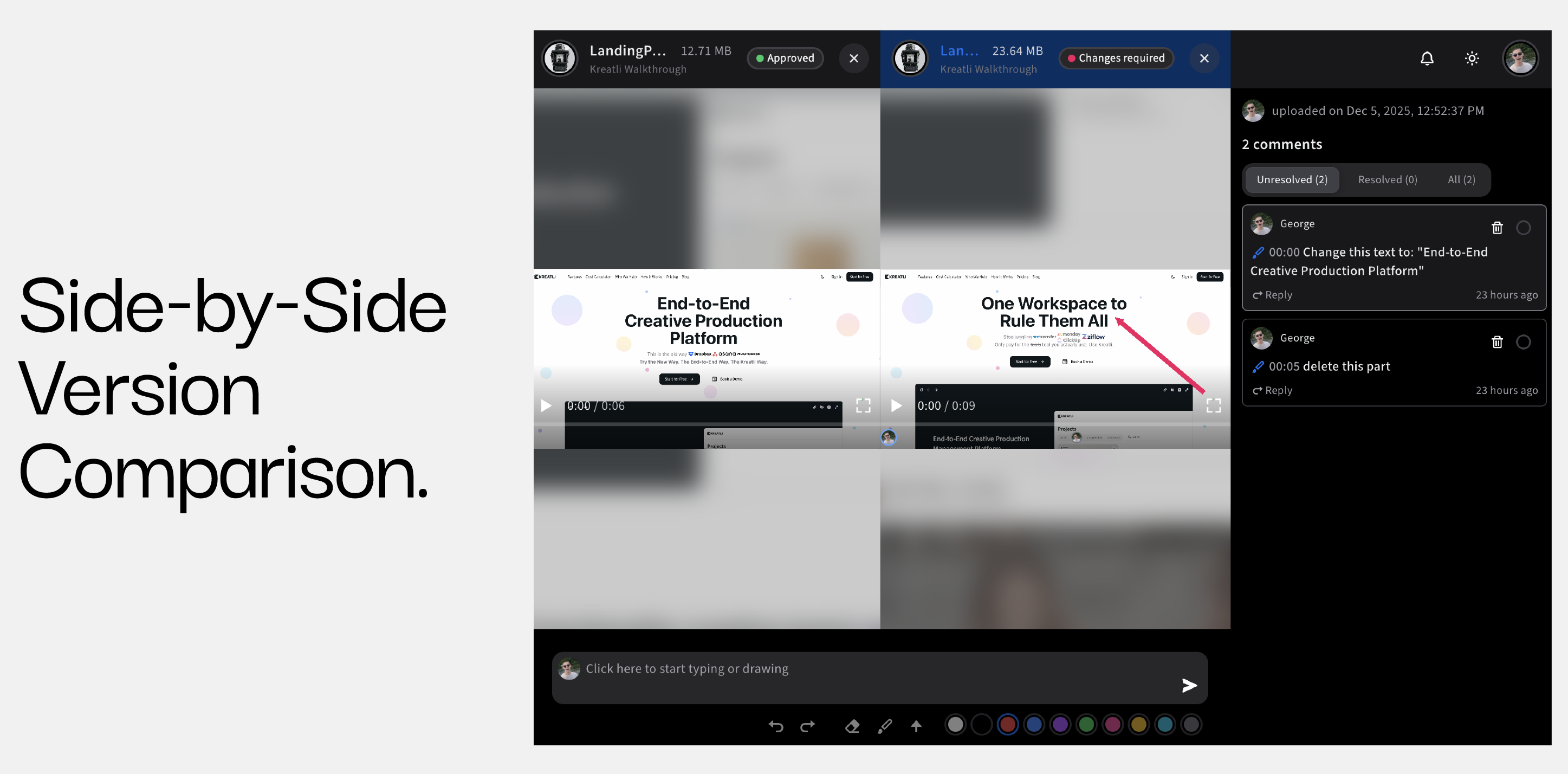
Instead of comparing files in isolation, teams use platforms that track revisions, approvals, and feedback together.
This is where tools like Kreatli come in - combining review + orchestration in one system.
3-Step Guide: How to Compare PDFs on Kreatli
Step 1: Make Sure You Have the Correct Versions
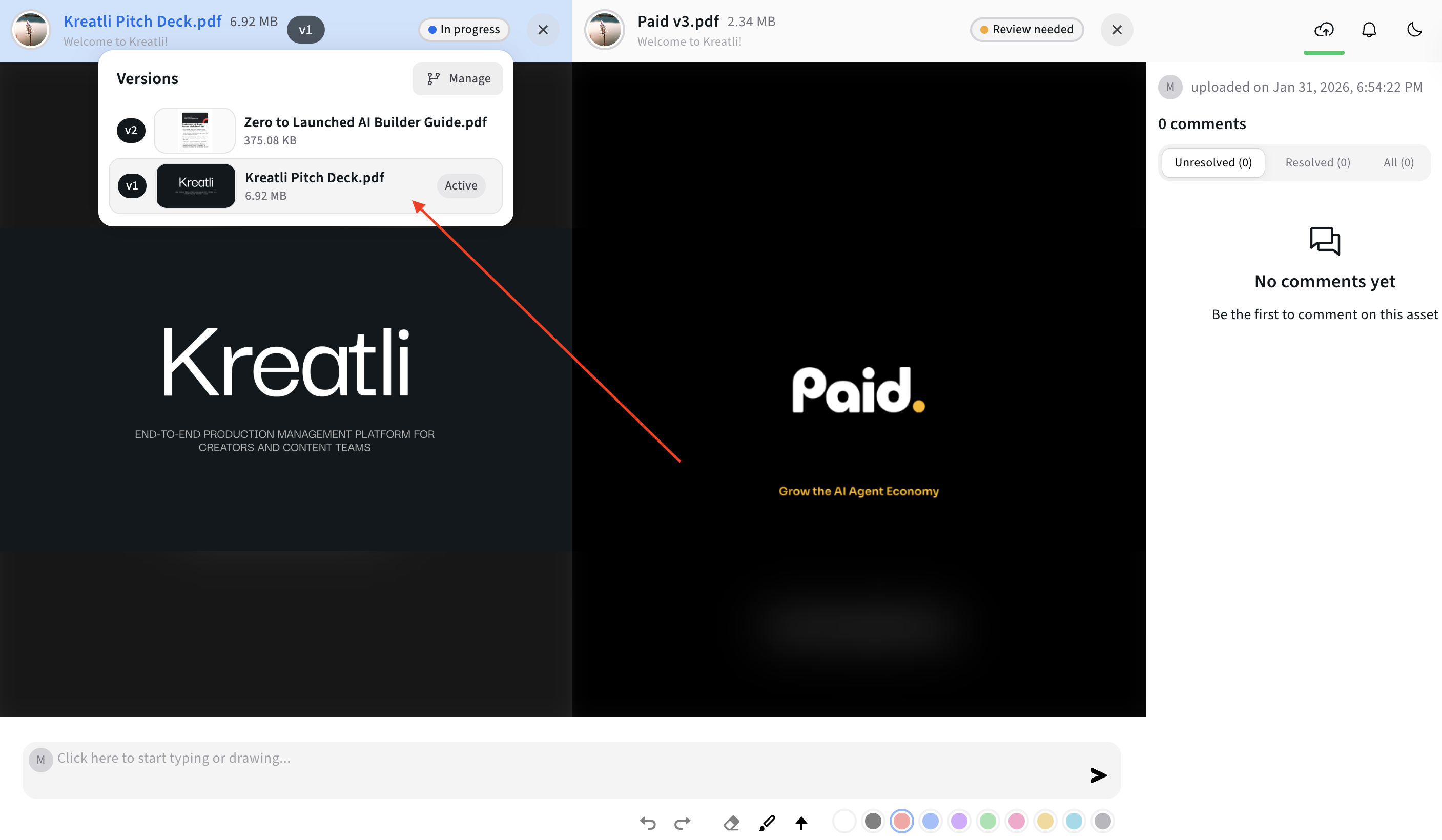
Before comparing, confirm:
Which file is “old”
Which file is “new”
Whether comments are included
Best practice: Use clear naming conventions or version history.
Step 2: Use a Dedicated Compare Feature
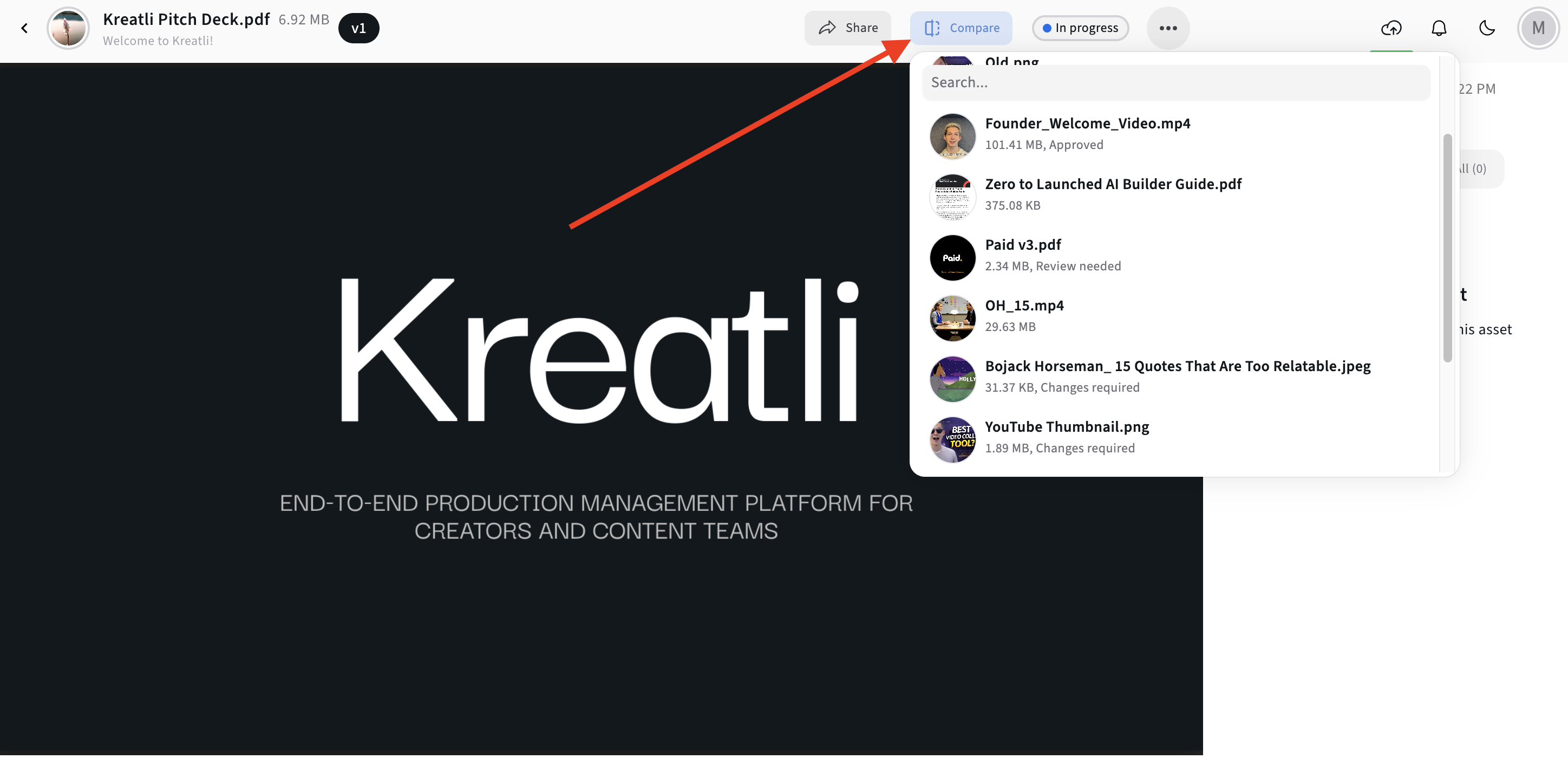
The easiest method is using built-in PDF compare feature on Kreatli.
Step 3: Review Changes & Collect Feedback in One Place
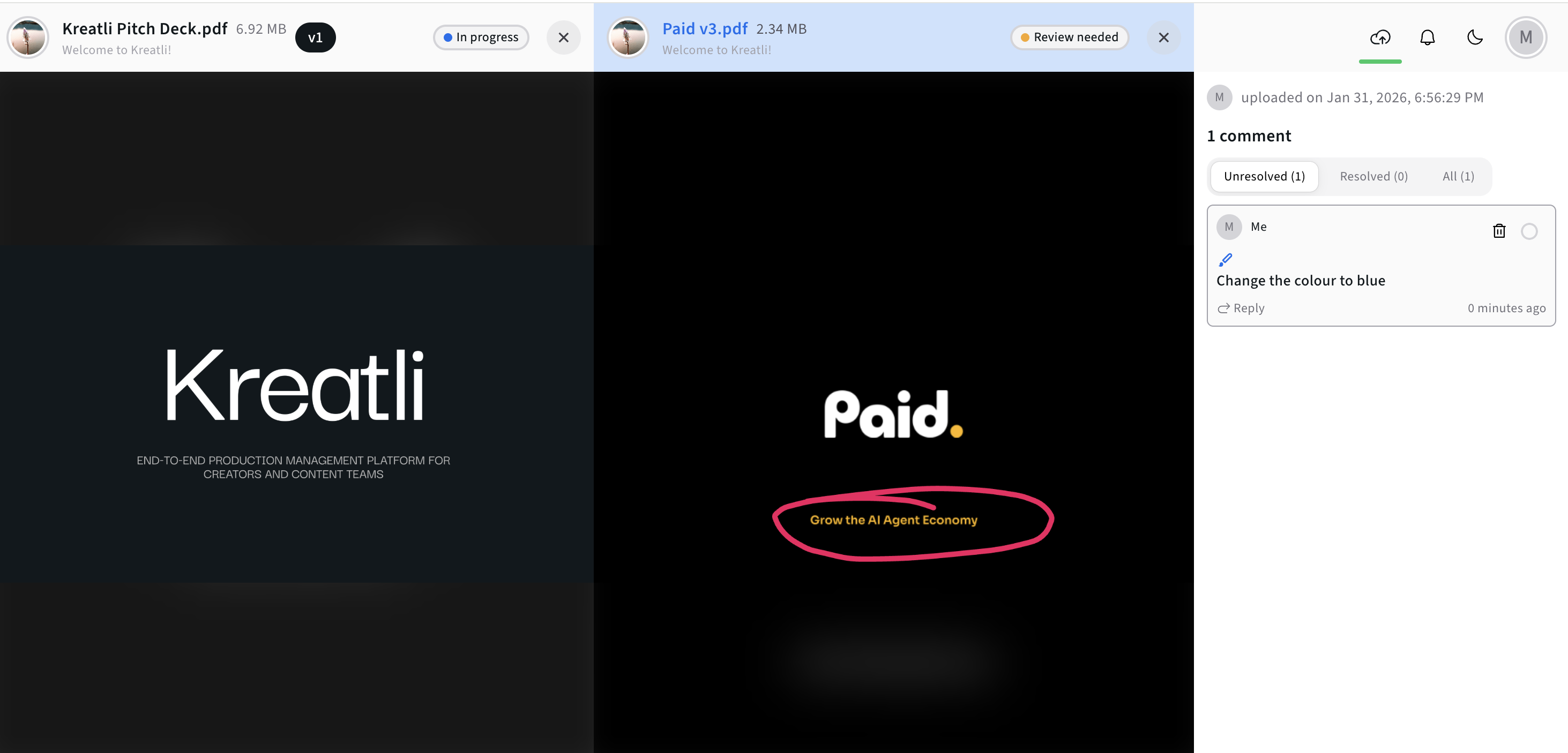
Comparison is only half the battle.
Most teams still struggle with:
Feedback spread across email
Comments lost in chat
No clear approval status
That’s why modern teams move beyond static PDFs.
Free Tools for Creative Teams
If you're already reviewing visual deliverables, Kreatli also offers free workflow utilities that help teams share files faster and reduce review friction.
Explore them here: Kreatli Free Tools
The Best Workflow for Teams: Compare + Review + Approve
Comparing PDFs becomes much more powerful when it’s part of a complete revision workflow.
That’s where Kreatli - a Video Collaboration & Review Platform with built-in project orchestration - fits naturally.
Instead of bouncing between tools, teams can:
Upload versions centrally
Track changes across iterations
Keep feedback tied to deliverables
Manage approvals without confusion
Learn more here: Kreatli Video Collaboration & Review Platform
Common Use Cases for Comparing PDFs
Creative Production Teams
Storyboards
Script revisions
Shot lists
Related: How to Draw on a Video
Marketing & Agency Reviews
Client pitch decks
Brand guidelines
Campaign approvals
Related: How to Share Video with Clients
Operations & Legal Teams
Contracts
Policy updates
Compliance documents
Best paired with strong version control.
Best Practices for Comparing PDF Files
Here are proven workflows that prevent errors:
Always Compare Against the Approved Version
Never compare two “draft” files without context.
Keep Comments Separate From Content Changes
Some tools treat annotations as edits - clarify what matters.
Use Centralized Version Tracking
Avoid “Final_v7_REALFINAL.pdf” chaos.
Kreatli’s positioning is exactly here: combining review + orchestration into one platform so teams don’t rely on scattered file systems.
Store Approvals Alongside the File
The real goal isn’t comparison - it’s confidence.
Best Tools to Compare PDF Files (Quick List)
Tool | Best For |
|---|---|
Adobe Acrobat Pro | Enterprise document workflows |
Draftable | Quick online comparisons |
PDF-XChange | Budget-friendly editing + compare |
Kreatli | Review + version control + approvals for production teams |
FAQ: Comparing PDF Files
How do I compare two PDF files for differences?
Use a PDF comparison tool like Adobe Acrobat’s “Compare Files” feature, which automatically highlights added or removed content.
What is the best free way to compare PDF files?
Free online tools exist, but they’re not ideal for confidential documents. For professional teams, version-controlled platforms are safer.
Can Google Drive compare PDF files?
No - Google Drive can store PDFs but does not offer true comparison highlighting.
How do creative teams manage PDF revisions better?
Instead of emailing versions back and forth, teams use centralized review platforms like Kreatli, which combines collaboration, approvals, and production management in one place.
Does Kreatli support document review workflows?
Yes - Kreatli is built for structured review, version tracking, and approval workflows across production deliverables.
Final Takeaway
If you only compare PDFs occasionally, built-in tools like Acrobat may be enough.
But if your team handles constant revisions, client feedback, and approval cycles, the real solution is moving beyond static comparison into an end-to-end review workflow.
That’s exactly where Kreatli stands out:
a Video Collaboration & Review Platform that also orchestrates production from first draft to final delivery.
Explore the platform here: Kreatli
Start Your 7-Day Free Trial
Try Kreatli free for 7 days and manage reviews, feedback, approvals, and versions in one workspace - no setup, no credit card.