Project Management Software for Creatives and Agencies (2026)
Which tool fits which creative team, with prices, picks for freelancers, small agencies and in-house teams, and where PM tools stop for client review of video and design files.
Article summary
Compare project management software for creatives: Asana, monday.com, ClickUp, Trello, Basecamp and Kreatli. Picks by team size, prices and client review.
The best project management software for creatives depends on team size. Freelancers do well with a light, cheap tool like Trello or a free plan. Agencies that send videos and designs to clients every week should pick a tool where tasks, files, feedback and approvals live in one project, or pair their PM tool with a review tool.
Most roundups compare the same task features. This one also looks at the part where creative teams lose the most time: getting clear client feedback on the actual file.
Comparison table
Prices come from each vendor’s own pricing page, checked on October 30, 2026. Prices change often, so check the vendor’s page before you buy.
Tool | Best for | Review of video and design files | Free plan | Paid plans from |
|---|---|---|---|---|
Kreatli | Agencies and in-house teams that review creative work with clients | Built in: video, image, PDF and audio review with timecoded comments, drawn markup and approval statuses | Exploration mode: 1 project, 2 files, no card | $14 per user per month (Creator, up to 3 members), billed monthly, 7-day trial |
Asana | Teams that plan many projects and need reporting | Attach files to tasks; check which plan includes proofing | Yes | $13.49 per user per month, billed monthly |
monday.com | Teams that want visual boards they can shape themselves | Attach files to items; check which plan includes annotations | Yes, up to 2 seats | €9 per seat per month, billed yearly, minimum 3 seats (EU pricing page) |
ClickUp | Teams that want tasks, docs and time tracking in one app | Attach files to tasks; check which plan includes proofing | Yes | $9 per user per month, billed yearly |
Trello | Freelancers and small teams with a simple pipeline | Attach files to cards | Yes | $6 per user per month, billed monthly |
Basecamp | Agencies that want one flat price and simple client access | Attach files to projects | Yes | $29 per month flat, no per-user fees |
Picks by team type
Freelancers and solopreneurs
You need something you can set up in an afternoon. Trello’s free plan or a free plan of Asana or ClickUp will track a simple pipeline: brief, in progress, with client, done.
The tool matters less than the review step. If you send cuts or designs to clients every week, a review link where they can comment on the file will save you more time than any extra task feature. Kreatli’s Creator plan costs $14 per user per month for up to 3 members, so a solo editor pays $14 a month.
Small agencies (3 to 10 people)
This is where client feedback starts to hurt. Five people send files to ten clients, and the notes come back by email, chat and phone. Someone has to collect them before work can start.
Pick a tool that keeps the file, the comments and the approval status together. In Kreatli, a project holds the tasks, the deliverables list and the files. Clients review through a guest link without an account. On the Team plan, 10 members cost $290 per month (10 x $29), with 2TB of storage.
If you already run your projects in Asana or monday.com and like them, keep them and add a review tool. See Kreatli vs Asana and Kreatli vs monday.com for how the two fit together.
In-house creative teams
In-house teams get requests from many departments, so intake and planning matter. Asana, monday.com and ClickUp are strong at forms, reports and planning across teams.
The gap is review. Stakeholders in marketing, product and legal all need to sign off on the same video or banner. A review tool where every file shows an approval status keeps that from turning into a long email thread. If you are setting up the whole process, our guide to creative operations management covers roles, stages and what to measure.
Where PM tools stop: client review of creative files
General PM tools track work about the file. Creative teams also need to work on the file itself. Here is a typical round of feedback on a 30-second video:
In a general PM tool: the editor attaches the video to a task. The client downloads it, watches it, and writes “at about 0:12 the logo is too small, and the music is too loud near the end.” The editor has to guess the exact moment. Another reviewer replies in email. Nobody is sure which version is the latest.
In a review tool: the client opens a link and clicks on the frame at 0:12. They draw a circle around the logo and type the note. The comment is pinned to that moment. The editor uploads version 2 on top of version 1 and compares the two side by side. The client marks it “Approved”.
Some PM tools have basic proofing or annotations on certain plans. Before you rely on one for client review, check three things:
Can comments be pinned to a moment in a video, not only to a whole file?
Can clients comment without creating an account or taking a paid seat?
Which plan includes it, and what does that plan cost for your team?
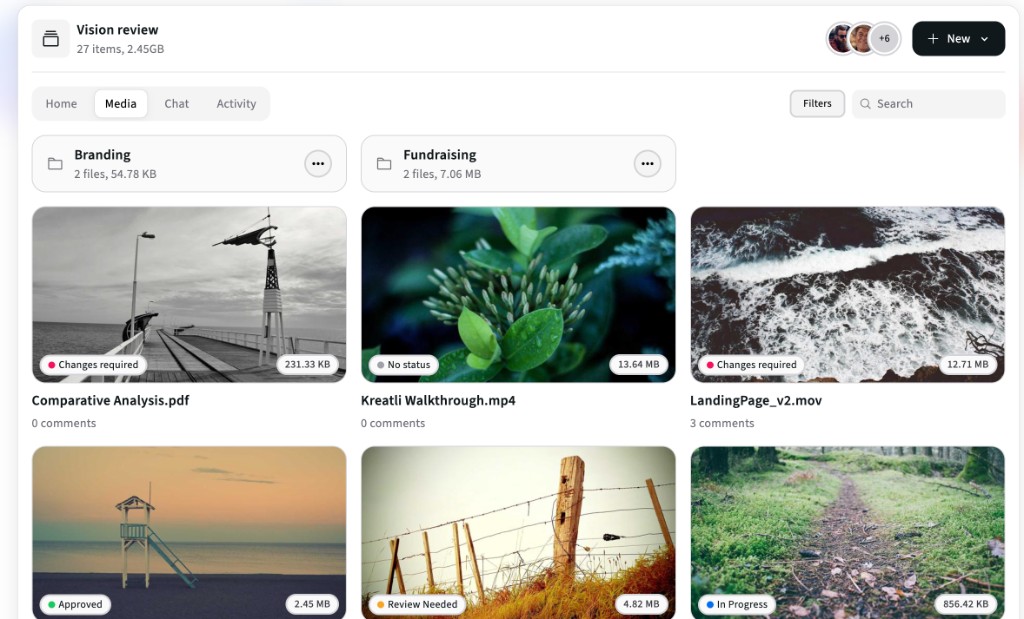
Each file shows its status, such as Approved, Review Needed or Changes required.
Kreatli as the review layer
Kreatli is a review and approval platform with project management built in for creative work. In one project you get:
Tasks on boards, with an owner and contributors, linked to the files they are about.
A deliverables list with owners and due dates.
Video, image, PDF and audio review with timecoded comments and drawn markup.
Version stacks and side-by-side version compare.
Custom approval statuses that guests see on the review link.
Guest review links that need no account and no paid seat.
Project chat, so talk about the work stays next to the work.
It doesn’t try to replace every feature of a large PM suite. If your team needs advanced portfolio reports or resource planning across hundreds of people, keep that tool and use Kreatli for review. See how tasks and files work together on the creative project management page.
Plans start at $14 per user per month, billed monthly, with a 7-day trial. You can also try Exploration mode for free with 1 project and 2 files, no card needed. See pricing or start your 7-day trial.
Can Kreatli become your Production Management Platform?
Keep project-related comments, media, and chats in one single place.