Annotate Video Online
Draw on a paused frame, pin the mark to the timestamp, and send a guest link. Clients annotate a video in the browser—no install, no burned-in graphics. This video annotation tool is for creative review, not machine-learning labeling.
Upload a video or image to get started
Drag and drop a file here, or click the button below
What is a video annotator?
A video annotator lets you draw and mark up a specific video frame, then pin that markup to the timestamp. Unlike a text-only comment, annotations show exactly where on screen something needs to change. Kreatli’s annotator is for review feedback, not burning graphics into an export.
When teams use this
- A designer circles a product that sits under a burned-in caption.
- An editor arrows a bad crop on a talking-head frame.
- A client sketches where a disclaimer should sit before export.
Annotations stay with the review thread; they are not an After Effects graphic layer. Use video markup when you specifically searched “markup,” and the platform annotation page for team projects.
Use this page when you searched for annotate video online. For team video annotation, see team video annotation. The cluster pillar is video review workflow. See Kreatli pricing or read how to mark up a video.
How to Annotate Videos Online
Add frame-accurate annotations, drawings, and markup to your videos. Follow these steps to upload, annotate, and share with your team or clients—all in your browser.
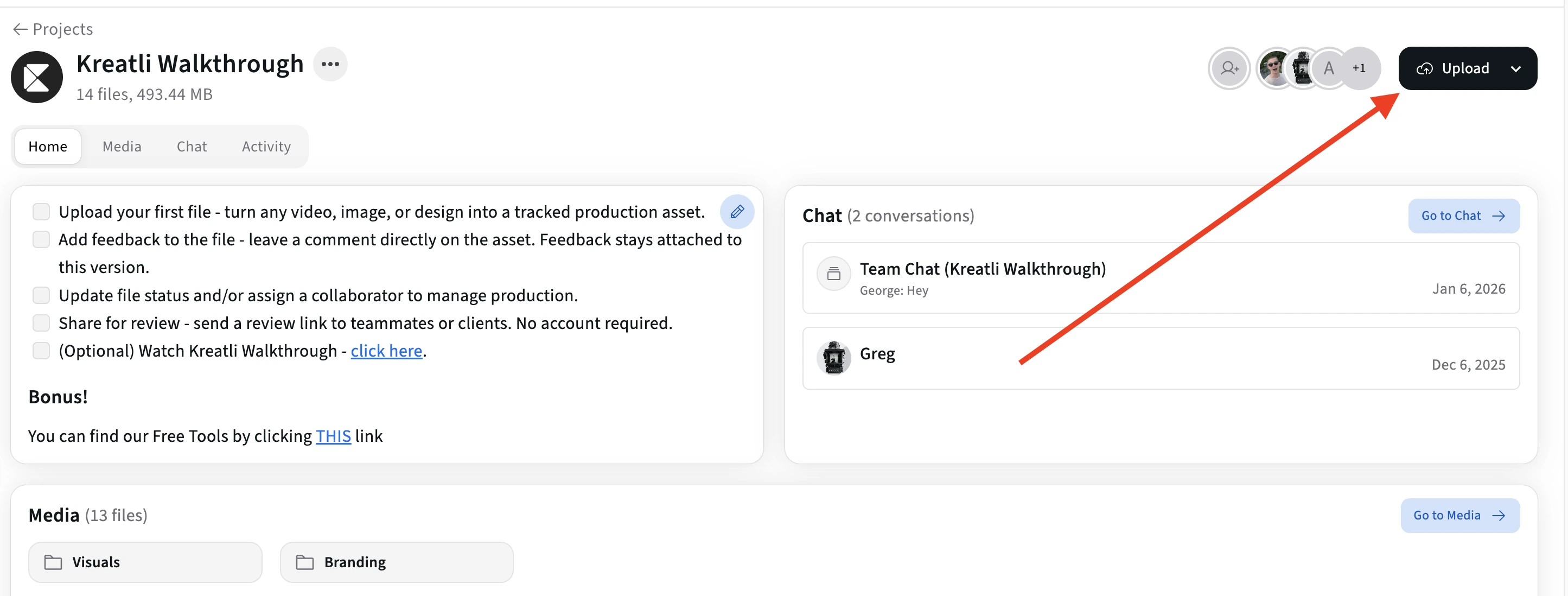
Upload Your Video
Upload your video to a Kreatli project. Your file is ready for frame-accurate annotation in the same workflow.
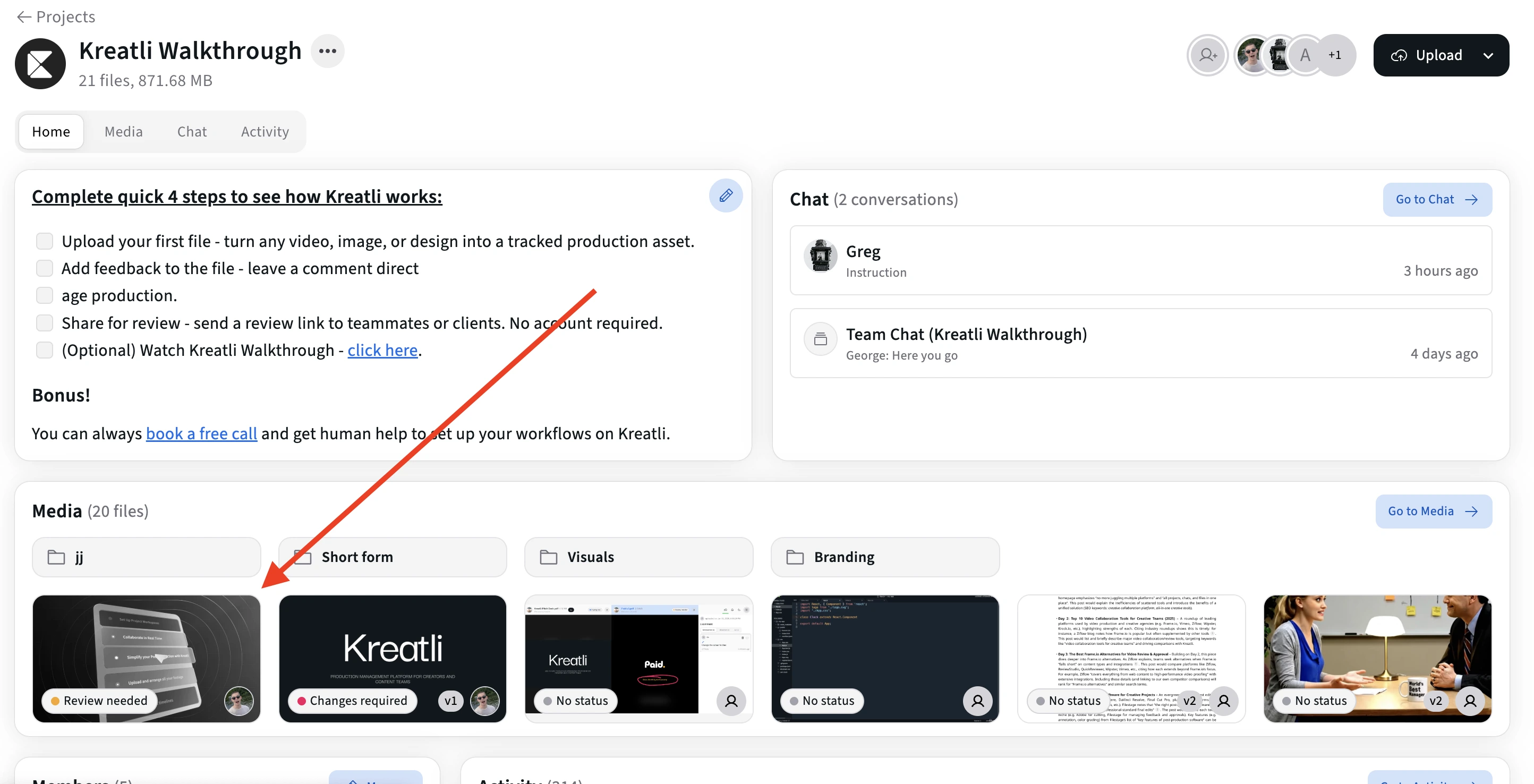
Open the Video in the Review Player
Open the asset to enter the frame-accurate annotation view. Scrub to any frame and add comments, drawings, or markup at precise moments.
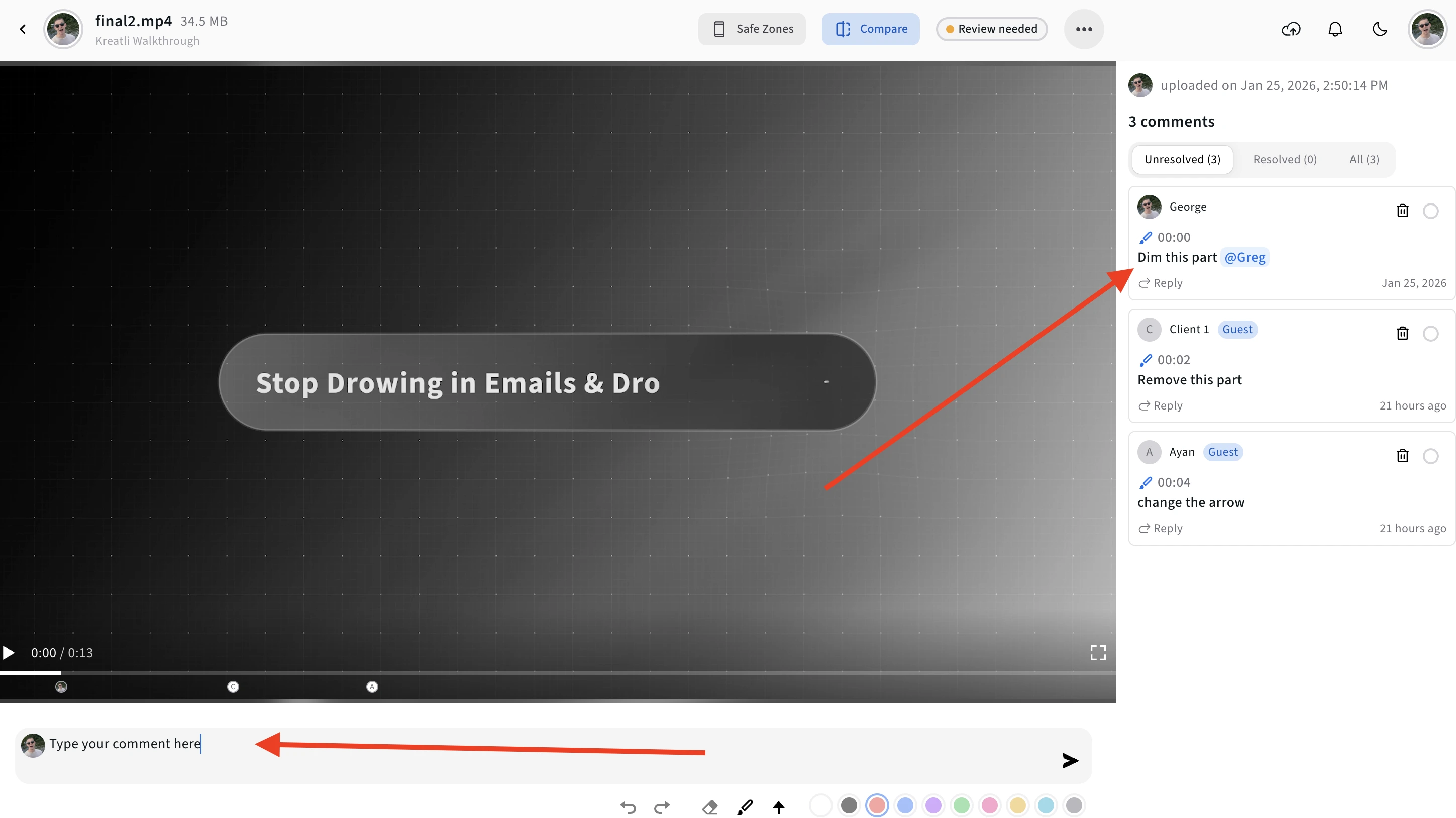
Add Frame-Accurate Annotations
Add comments, drawings, and shapes pinned to specific frames. Use text for feedback, draw on the frame to highlight areas, and use arrows or markers to point to elements.
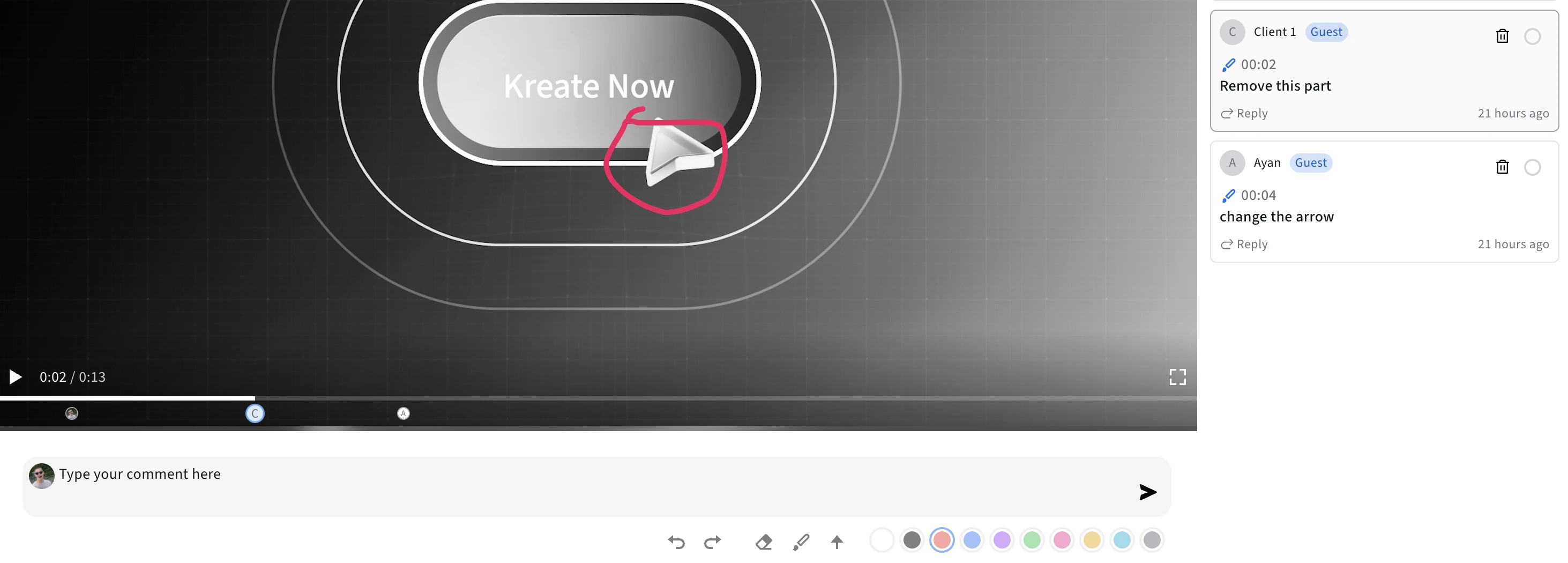
Use the Timeline to Review and Jump to Frames
See all annotations on the timeline and jump to any frame to address feedback. Navigate directly to annotated moments without guessing timestamps.
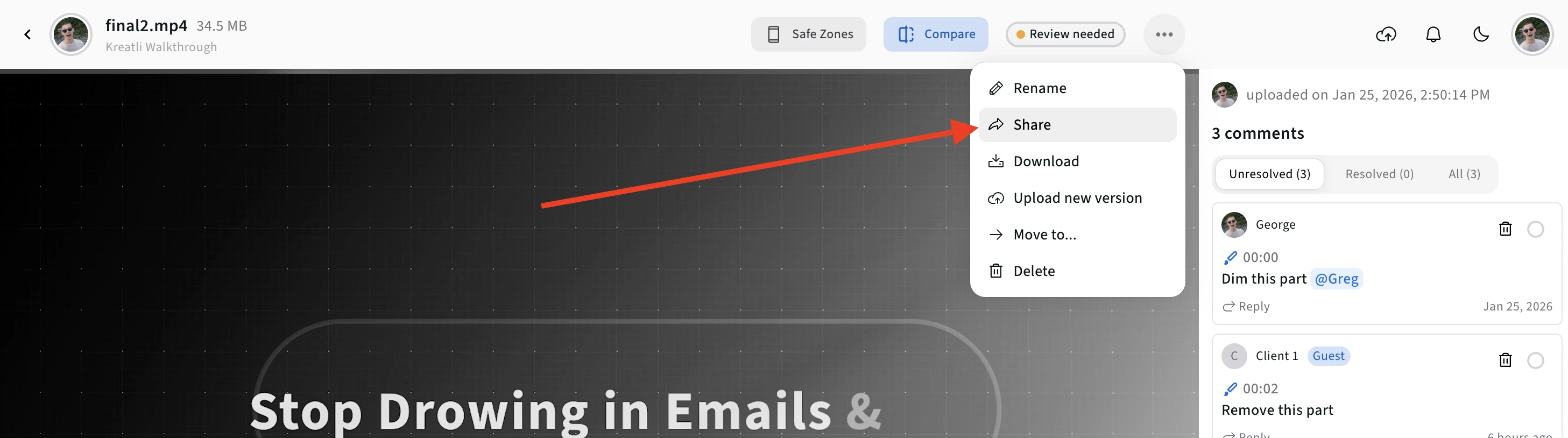
Share for Approval or Track Resolution
Share a link so reviewers can annotate without signing up. Mark annotations as resolved as you address them and keep everyone aligned on what’s done and what’s pending.
Video Annotator Features
Frame-accurate markup, multiple annotation types, and collaboration—everything you need to give precise feedback on video.
Frame-Accurate Annotation
Every comment and drawing is pinned to an exact frame and timestamp. Jump directly to the moment that needs attention—no more scrubbing to find the right spot.
Drawings & Shapes
Draw directly on video frames with freehand tools, shapes, arrows, and markers. Highlight issues and point to specific elements so editors see exactly what to change.
Guest Annotator Links
Share secure links so clients and stakeholders can annotate videos without creating an account. Reduces friction and speeds up the feedback loop.
Multi-Reviewer Annotation
Multiple people can annotate the same video. See who added each comment or drawing, filter by reviewer, and consolidate all feedback in one place.
How to annotate a video (creative markup, not ML labeling)
Search “annotate a video” and you get two kinds of results: computer-vision datasets (bounding boxes, CVAT) and creative review. This page is the second. Pause the frame, draw the problem, pin it to the timestamp, send a guest link. Editors jump to the mark. It is not a YouTube caption tool and it does not train a model.
If you need timestamped notes without drawing, use the video feedback tool. If you need approval status on a version, use the video reviewer.
Explore Video Annotation in Kreatli
Learn more about frame-accurate video annotation, drawing on video, and approval workflows.
More Tools for Video Teams
Sign up free — no credit card required — and try these tools in Exploration Mode. Start a 7-day free trial when you’re ready for unlimited access.
Video Feedback Tool
Give frame-accurate feedback on videos with comments, annotations, and markup. Share review links with clients; recipients do not need a Kreatli account.
Video Reviewer
Review videos online with frame-accurate comments, visual annotations, and approval workflows. Share with clients; recipients do not need a Kreatli account.
Video Frame Extractor
Extract still frames from a video and download them as PNG/JPG. Processing runs locally in your browser for fast exports. Sign in to use the tool; start a trial or choose a plan if your subscription isn’t active.
Video Proofing Tool
Proof videos with frame-accurate comments, annotations, and approvals. Share proofing links; recipients do not need a Kreatli account.
Frequently Asked Questions
Common questions about how to annotate a video, video annotation tools, and frame-accurate markup.
Still Have Questions?
Contact us at support@kreatli.com.
More Resources
Explore other Kreatli platform features for video annotation, review, and collaboration.
Video Annotation
Add frame-accurate annotations, drawings, and markup directly to video frames. Pin comments to exact timestamps and collaborate with precise visual feedback.
Video Reviewer
Review videos online with frame-accurate comments, visual annotations, and approval workflows. Recipients do not need a Kreatli account on shared review links.
Video Feedback Tool
Video review and approval in one video review tool: frame-accurate comments, markup, and shareable review links for creative teams.
How to review a video
Step-by-step video review for creative teams.
Wondering how Kreatli compares? See the best video review platforms for creative teams →
Ready to annotate videos with your team?
Kreatli offers frame-accurate video annotation, drawing on video, and approval workflows. Add comments and markup pinned to exact frames—all in one place.