YouTube Banner Size & Resizer
The YouTube banner size is 2560×1440 px (16:9), with text and logos inside the centered 1546×423 safe area. Upload any image to resize it: Fit places the whole image in the 1546×423 safe zone (pick a pad color). Fill crops a 16:9 window. Preview TV, desktop, tablet, and mobile. Sign up free to preview. Downloads need a one-time $4.99 lifetime unlock (or an active Kreatli plan).
Need a video thumbnail instead? YouTube thumbnail resizer (1280×720). Posting Shorts too? Check Shorts safe zones. Next job a cut, not a crop? Video reviewer, video feedback, or frame rate converter.
YouTube channel banner dimensions (2026)
YouTube channel banner size, safe area and file requirements, checked against YouTube Help on 2026-10-16.
| Spec | Value |
|---|---|
| Recommended size | 2560 × 1440 px |
| Safe zone (text & logos) | 1546 × 423 px |
| Minimum size | 2048 × 1152 px |
| Max file size | 6 MB |
| Accepted formats | JPG, PNG, GIF, BMP |
Visible banner area on TV, desktop, tablet and mobile
| Device | Visible area | What shows |
|---|---|---|
| TV | 2,560 × 1440 px | Full canvas is visible |
| Desktop | 2,560 × 423 px | Full width, center strip |
| Tablet | 1,855 × 423 px | Center strip, sides cropped |
| Mobile | 1,546 × 423 px | Safe area: visible everywhere |
YouTube Help states the text-and-logo safe area as 1235 × 338 px at the 2048 × 1152 minimum size; scaled to the recommended 2560 × 1440 canvas that is about 1546 × 423 px. Per-device areas are the preview areas this resizer uses, not an official YouTube table. Source: YouTube Help.
Need other YouTube sizes? See YouTube thumbnail, profile picture, Shorts and video sizes.
Resize, preview devices, and download
Drag and drop your image here
or click to browse
Resize for YouTube
Download is always 2560×1440 px. Fit places the whole image inside the 1546×423 safe zone. Fill crops a 16:9 window.
Mode
Output size: 2560×1440 px (YouTube recommended)
Export
After the banner: review the cut
Channel art is one file. If the next job is a video—not another crop—use the video reviewer, collect notes in the video feedback tool, or convert frame rate before delivery. Draw-on-frame markup is the video annotator.
What is a YouTube Banner Resizer?
A YouTube banner resizer crops or scales channel art to the correct dimensions and safe areas for desktop, mobile, tablet, and TV. Brand and social teams use it to validate layouts before publish so critical logo and copy are not clipped on smaller screens.
How to Use the YouTube Banner Resizer
Follow this step-by-step process to resize your YouTube banner correctly and avoid cropping issues across all devices.
Upload Your Banner Image
Upload your existing YouTube banner or any image you want to use as channel art. You can start with a fully designed banner, a draft image, or a resized export from Figma, Photoshop, or Canva. The tool accepts common image formats and prepares them for YouTube's banner canvas.
Apply the YouTube Banner Template
Once uploaded, the tool automatically applies YouTube's recommended banner dimensions (2560 × 1440px) and displays the exact center safe zone (1546 × 423px) that's visible on all devices. Anything outside the safe zone is clearly marked, so you can adjust with confidence.
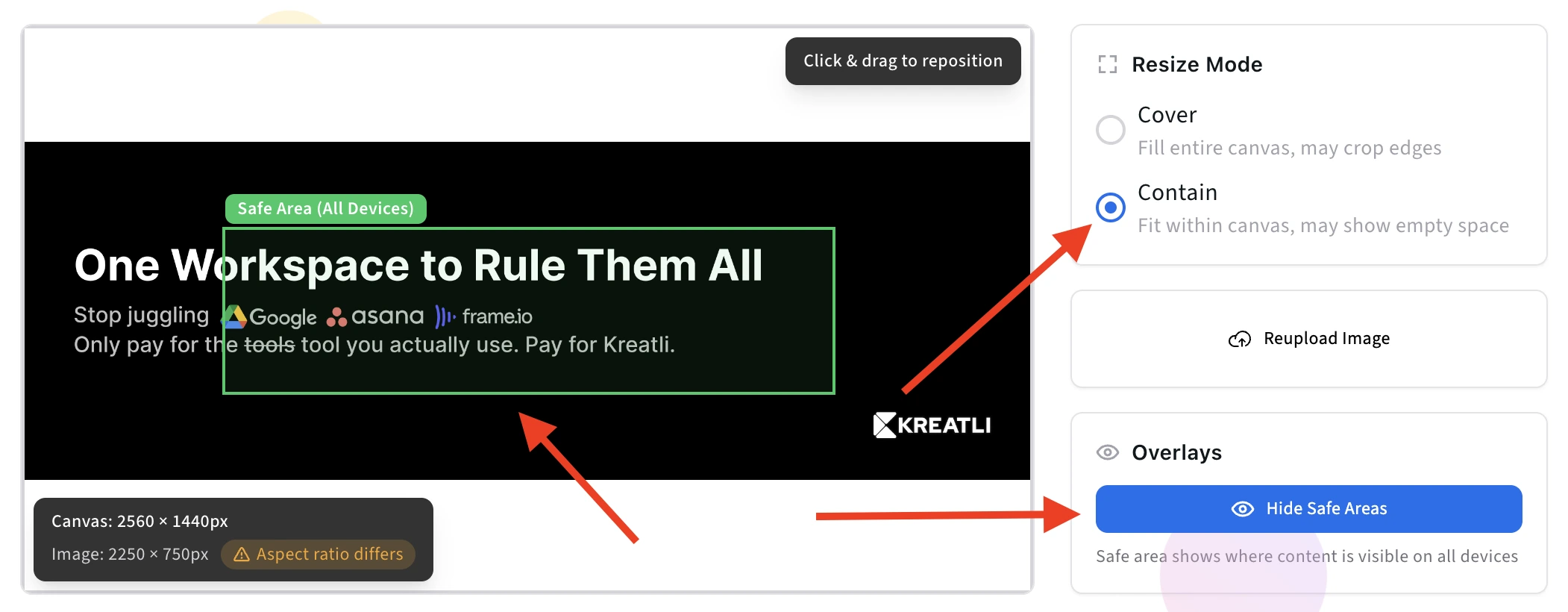
Adjust Key Elements and Preview
Use the device previews to see how your banner will appear on desktop, mobile, tablet, and TV. Make sure all critical elements like logos, text, and taglines stay within the highlighted safe zone. Decorative visuals can extend beyond it. This step eliminates the trial-and-error usually required when uploading banners directly to YouTube.
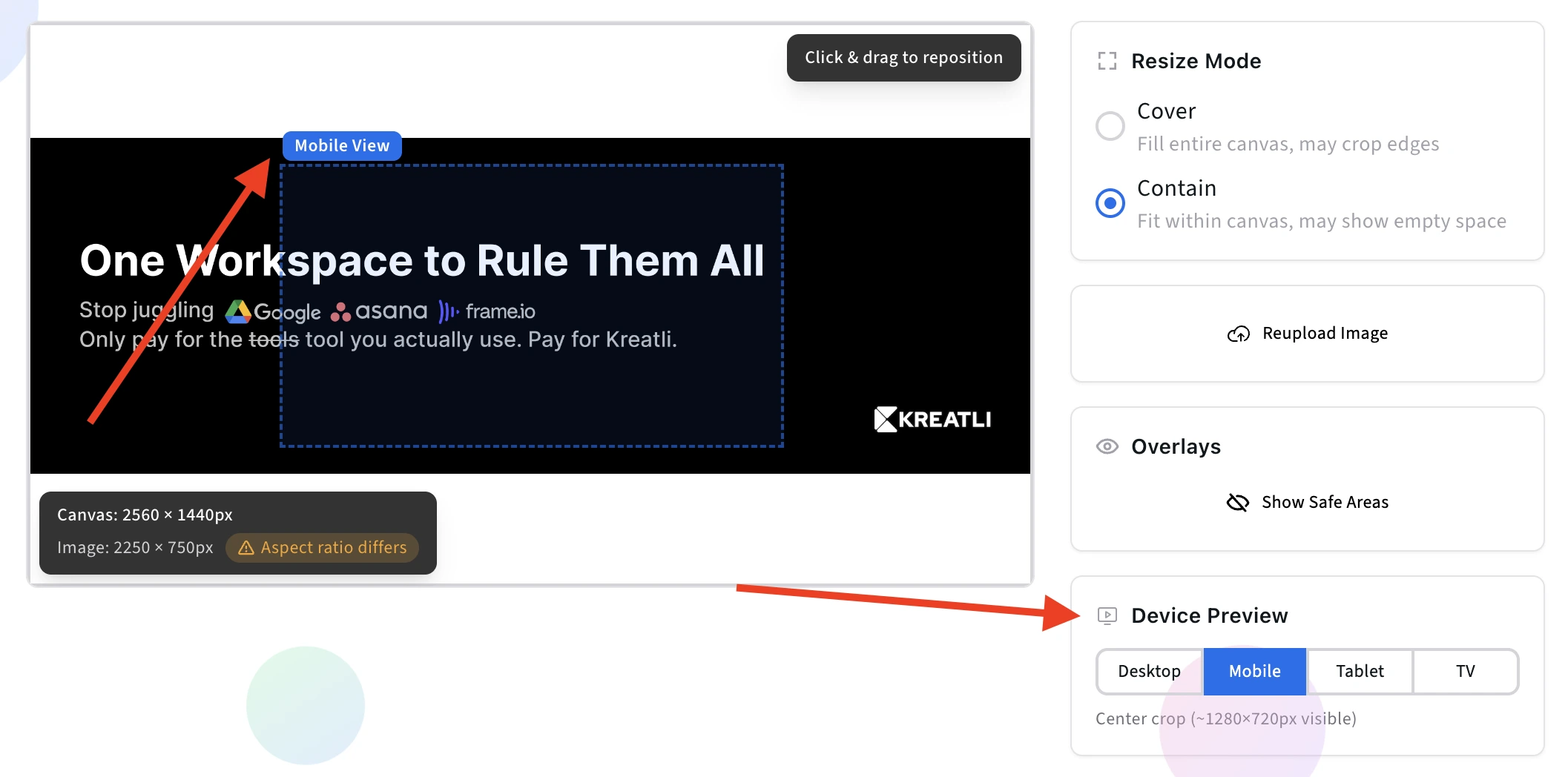
Export and Download Your Banner
Download the final banner in YouTube's recommended dimensions (2560 × 1440px). Your export preserves safe area alignment so key elements stay visible across desktop, mobile, tablet, and TV.
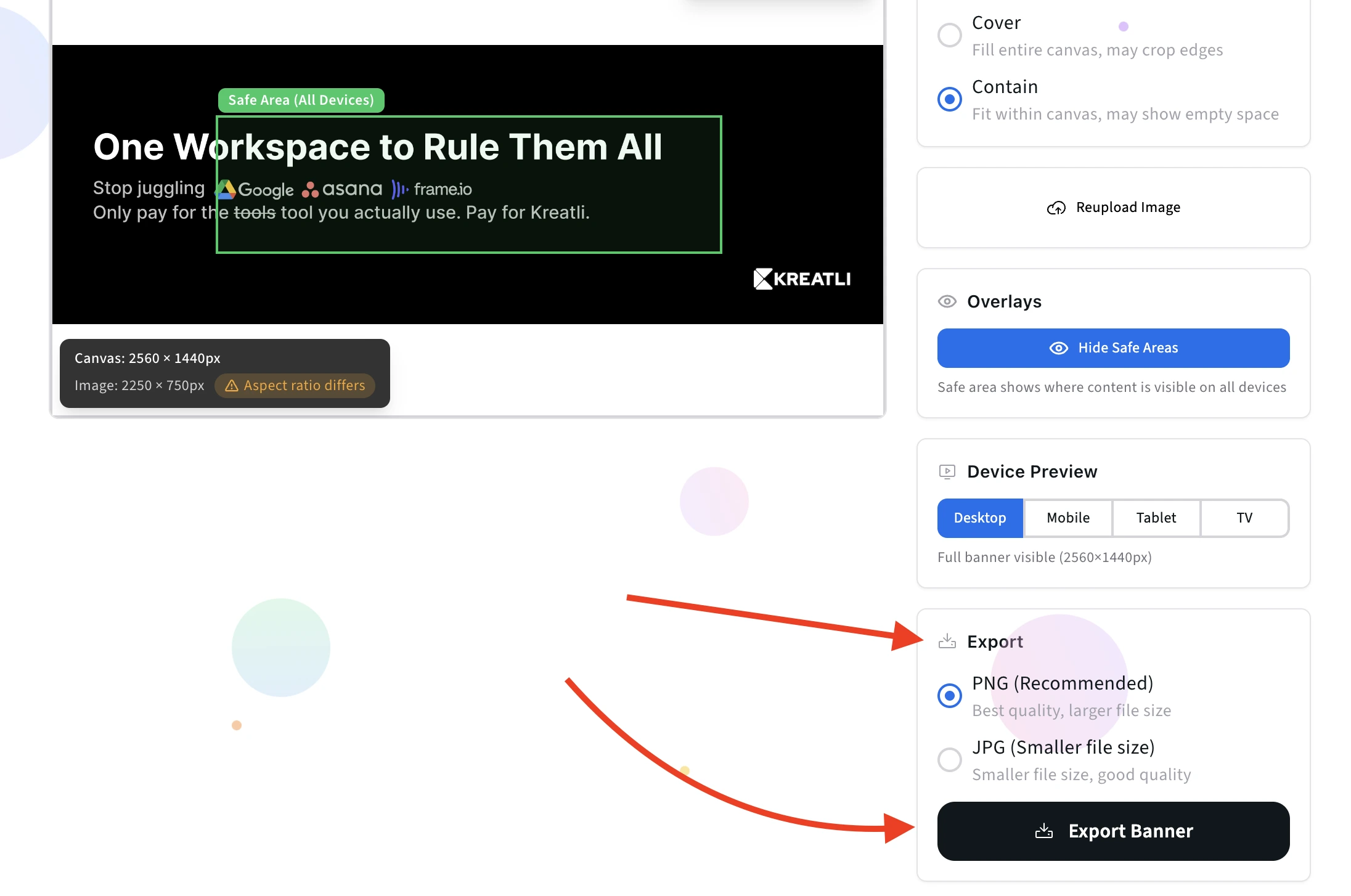
Upload to Kreatli for Team Review
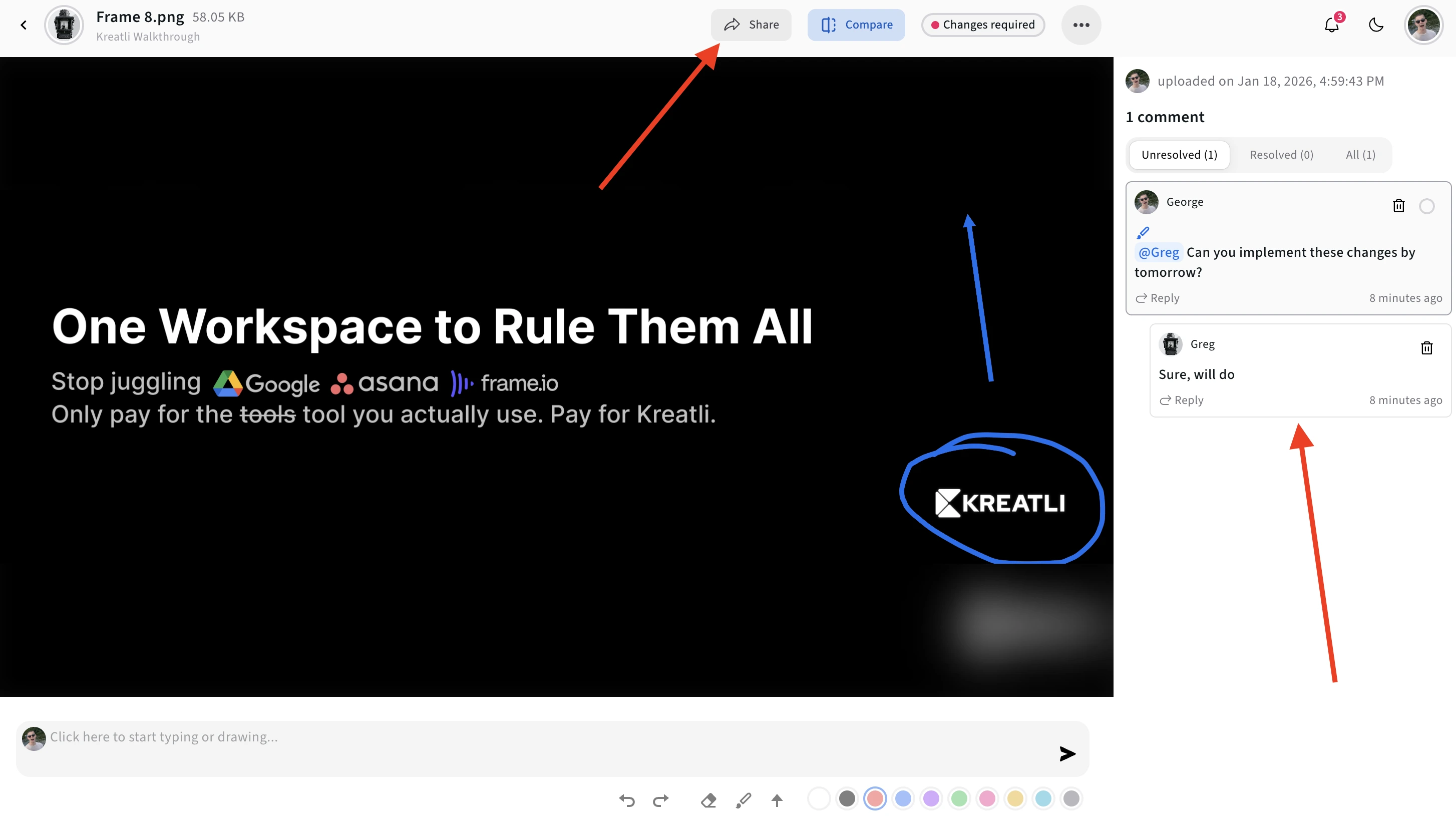
Upload your exported banner to Kreatli to share with your team for collaborative review. Collect feedback, align on safe area placement, and document final approvals—so your channel art stays consistent across updates and stakeholders.
Or skip the workspace and open a free tool: video reviewer, video feedback, frame rate converter, or video annotator.
YouTube Banner Size & Safe Area Explained
Understanding YouTube banner dimensions and safe areas ensures your channel art looks perfect on all devices. This guide covers everything you need to know about creating effective YouTube banners that work across desktop, mobile, tablet, and TV screens.
Banner Dimensions
- Recommended size: 2560 × 1440 pixels
- Aspect ratio: 16:9
- Minimum size: 2048 × 1152 pixels
- File size limit: 6MB (YouTube limit)
Safe Area
- Safe area size: 1546 × 423 pixels
- Position: Centered horizontally and vertically
- Purpose: Guaranteed visibility on all devices
- Best practice: Place logos, text, and CTAs within this zone
Why Banners Get Cropped
YouTube displays channel banners differently across devices to optimize the viewing experience:
- Desktop: Full banner visible (2560 × 1440px)
- Mobile: Center portion cropped (~1280 × 720px visible)
- Tablet: Medium crop (~2048 × 1152px visible)
- TV: May crop top/bottom depending on screen size
This is why the safe area is crucial—it ensures your important content (channel name, tagline, logo) stays visible regardless of the device your viewers use. For similar considerations when creating video content, check out our Safe Zone Checker to ensure your YouTube Shorts, Instagram Reels, and TikTok videos display correctly.
Read Our Complete Guide
Learn everything about YouTube banner dimensions, safe zones, best practices, and how to create perfect channel art that works across all devices.
Read Complete GuideNext: review, feedback, FPS, annotator
Use these when the job is a cut, not another crop: timestamped review, client feedback, FPS conversion, and frame markup.
Video Reviewer
Review videos online with timecoded comments, visual annotations, and approval workflows. Share with clients; recipients do not need a Kreatli account.
Video Feedback Tool
Give timecoded feedback on videos with comments, annotations, and markup. Share review links with clients; recipients do not need a Kreatli account.
Video Frame Rate Converter
Convert video frame rate to constant 24fps, 25fps, 30fps, 50fps, or 60fps in your browser. Sign in to use the tool; start a trial or choose a plan if your subscription isn’t active.
Video Annotator
Add timecoded comments, drawings, and markup to video. Pin feedback to exact timestamps and share with clients; recipients do not need a Kreatli account.
Frequently Asked Questions
Common questions about YouTube banner dimensions, safe areas, and using our free banner resizer tool.
Related Resources
Review a cut, collect timestamped feedback, or convert FPS after you export the banner.
Video Reviewer
Review videos online with timecoded comments, visual annotations, and approval workflows. Recipients do not need a Kreatli account on shared review links.
Video Feedback Tool
Video review and approval in one video review tool: timecoded comments, markup, and shareable review links for creative teams.
Video Frame Rate Converter
Convert video FPS in the browser to 24, 25, 30, 50, or 60 for delivery or post.
Video Annotator
Annotate a video online: draw on a frame, pin the mark to the timestamp, and share a guest review link.
Banner done? Review the cut next
Timestamped comments, guest links, and FPS conversion are already on Kreatli. Start with the video reviewer if you have a file today.