Video Review
Watch the cut, leave comments editors can jump to, and record approval on a version. Guest links work without a download. This page is the video reviewer; video review software (versions, sign-off, audit) lives in the same workflow.
Upload a video or image to get started
Drag and drop a file here, or click the button below
What is a video review?
Video review is watching a cut and leaving feedback pinned to exact frames and timestamps. A video reviewer replaces vague notes like “around the middle” with comments editors can jump to instantly. Kreatli’s online video review tool also supports markup, guest review links, and approval status on each version.
When teams use this
- An editor shares a first cut so a producer can mark every missed lower-third without writing timecodes in Slack.
- An agency sends a guest review link so a client can approve a 30-second spot from a phone.
- A motion team QC’s a version before it goes to the broader approval workflow.
This is a DIY video review player for one file at a time. It does not replace a project workspace with boards, owners, and formal sign-off history—use the team video review workflow for that.
Use this page when you searched for video review. For team video review workflow, see team video review workflow. The cluster pillar is review and approval. See Kreatli pricing or read how to review a video.
How to Review Videos Online
Streamline your video review process with frame-accurate comments, visual annotations, and approval workflows—all in your browser.
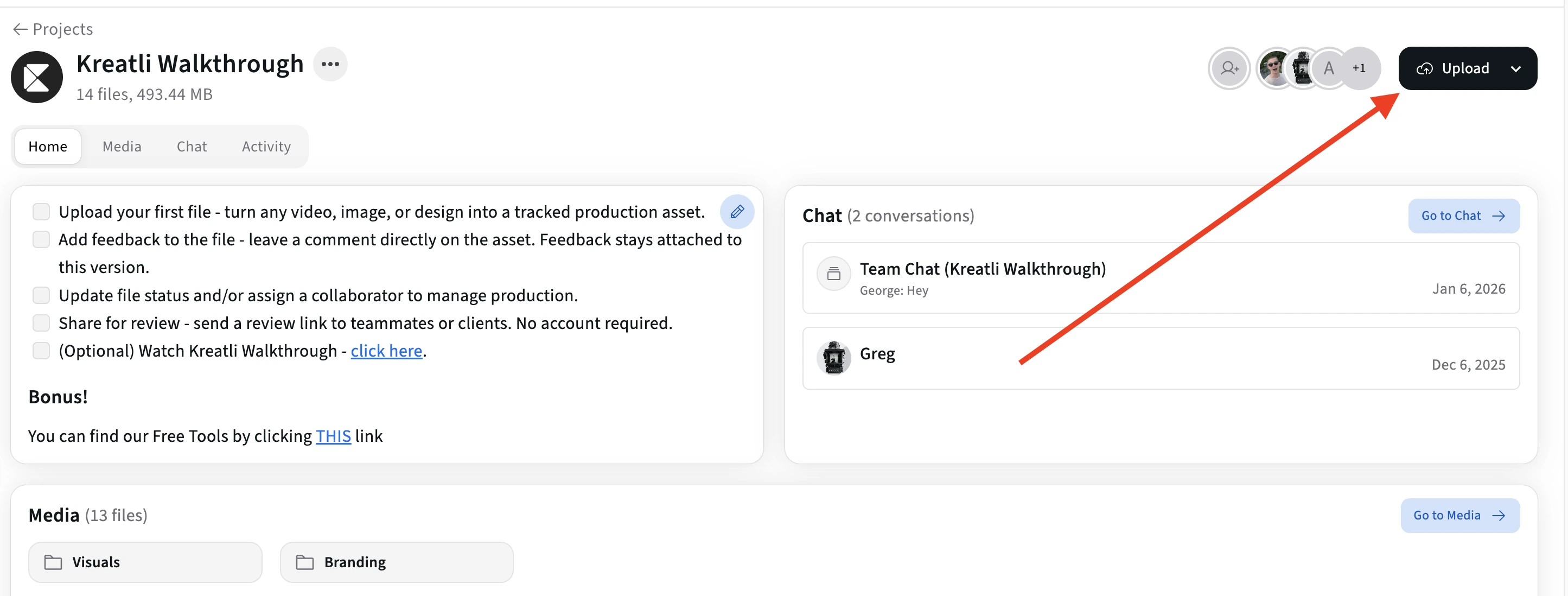
Upload Your Video for Review
Upload your video to start the review process. Supports MP4, MOV, and WebM formats. Your video is ready for review in seconds.
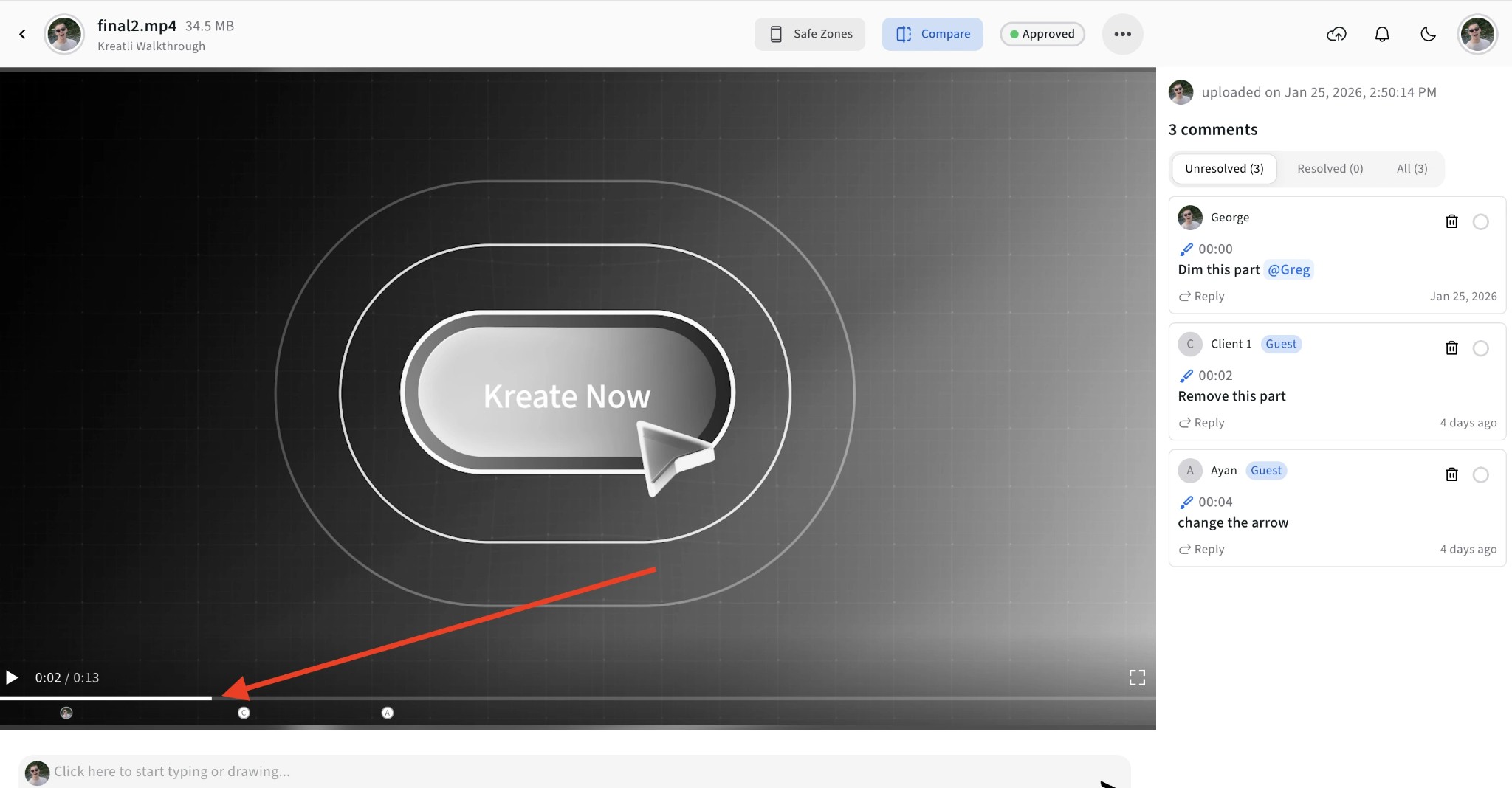
Navigate to Any Frame
Use the timeline scrubber to navigate to any moment in the video. Frame-accurate navigation ensures reviewers can comment on the exact moment that needs attention.
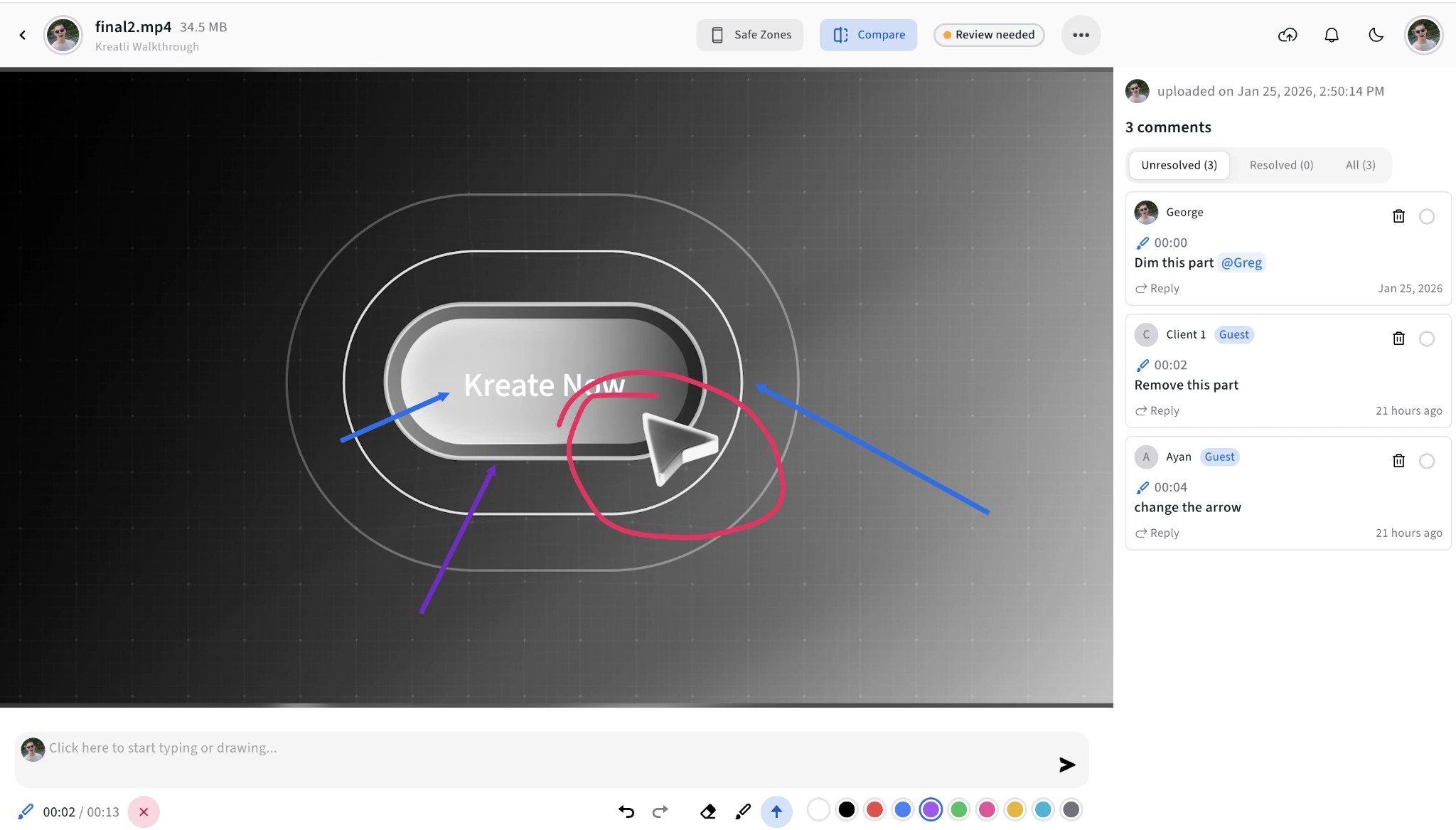
Add Comments and Visual Markup
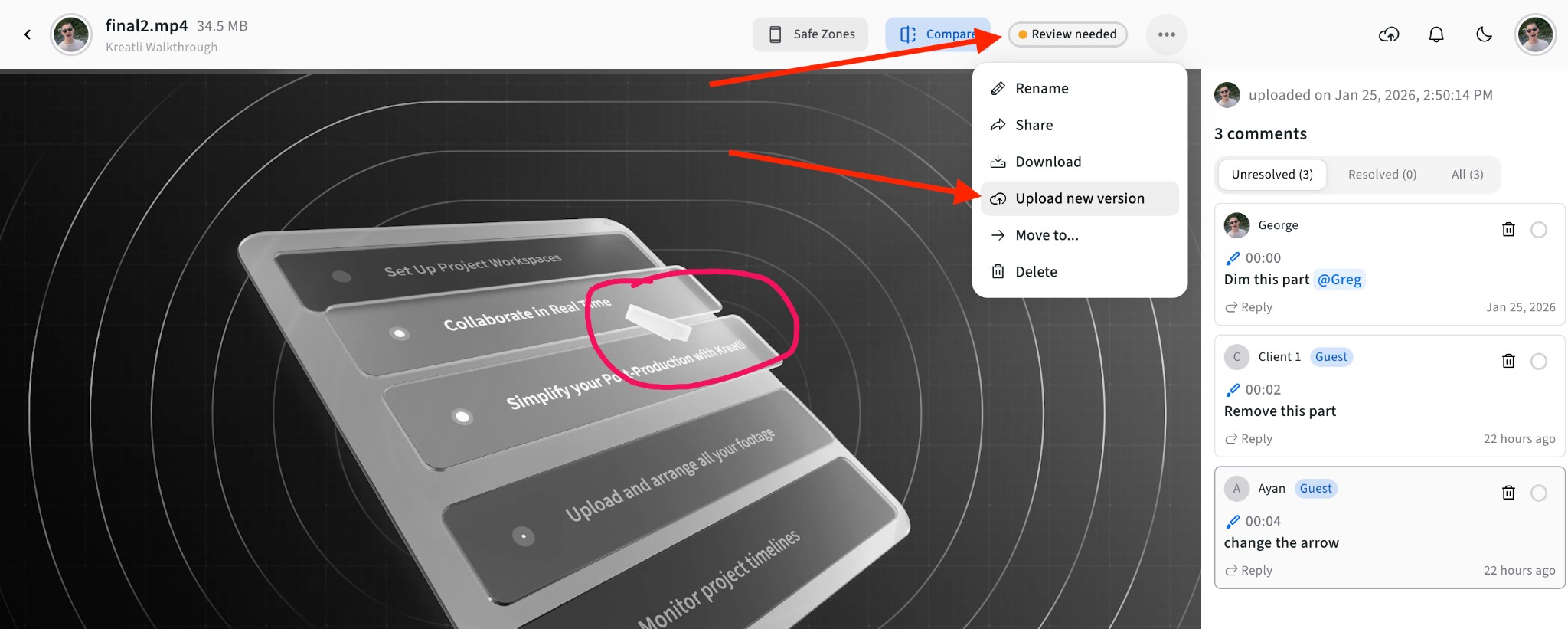
Leave comments pinned to specific frames. Draw on the video with shapes, arrows, and freehand tools to highlight exactly what needs to change.
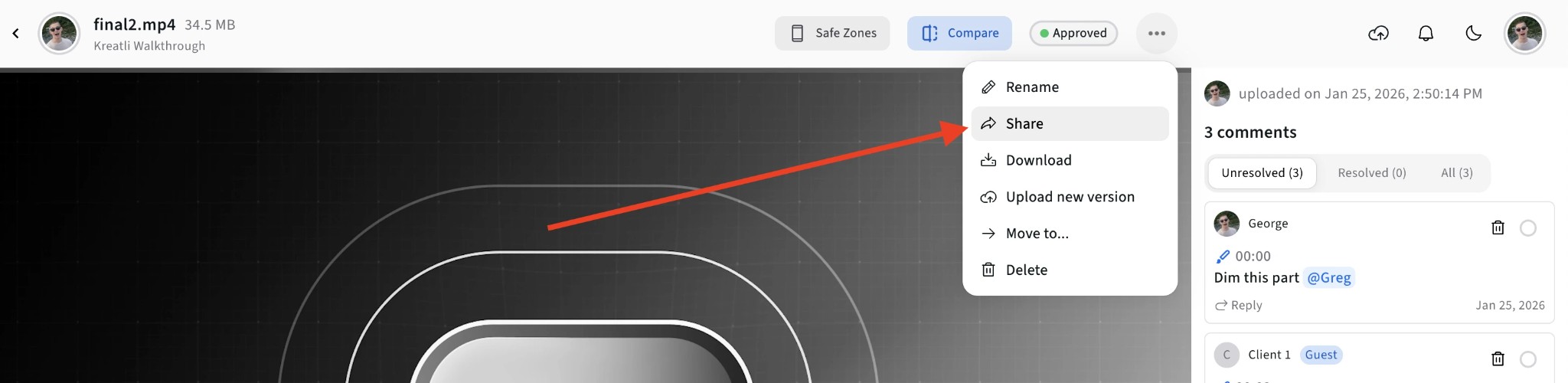
Share with Reviewers
Generate a shareable review link. Clients, stakeholders, and team members can review the video and add their own feedback without creating an account.
Approve or Request Changes
Reviewers can approve the video or request changes. Track approval status, see who approved which version, and maintain a complete audit trail.
Video Reviewer Features
Everything you need to review videos efficiently—from initial feedback to final approval.
Frame-Accurate Review
Every comment is pinned to an exact frame and timestamp. Jump directly to the moment that needs attention—no more scrubbing through videos to find the right spot.
Visual Annotations
Draw directly on video frames to highlight issues. Use shapes, arrows, and freehand tools to communicate changes visually—clearer than text alone.
Guest Review Links
Share secure review links with anyone. Clients and stakeholders can review and comment without creating an account—reducing friction in the approval process.
Approval Workflows
Built-in approval system lets reviewers approve or request changes. Track who approved what, when, and maintain a complete audit trail for every version.
Version Management
Upload new versions and compare them side by side. See feedback from previous versions, track changes, and keep a complete revision history.
Multi-Reviewer Support
Multiple reviewers can comment simultaneously. See who wrote each comment, filter by reviewer, and consolidate all stakeholder feedback in one place.
Video review software, tools, and platforms
People search all three. A video review tool is the player on this page: comments, markup, guest link. Video review software adds versions, approval status, and an audit trail. A video review platform is the workspace around that—projects, clients, multiple files. Kreatli covers the tool and the software; the platform pages are for teams buying the workspace.
After you convert frame rate, send the cut here instead of email. Draw-on-frame markup lives in the video annotator; threaded notes without drawings live in the video feedback tool.
Who Uses Video Reviewers?
Video reviewers streamline workflows for agencies, production studios, and in-house creative teams.
Agencies & Studios
Review client deliverables, collect feedback, and get approvals faster. Share review links that work without requiring clients to install software or create accounts.
Post-Production Teams
Review edits, color grades, and VFX shots with frame-accurate precision. Document issues at exact timecodes and track fixes across revision rounds.
Marketing Teams
Review campaign videos with stakeholders across departments. Consolidate feedback from legal, brand, and creative teams in one place before final delivery.
Explore Kreatli's Video Review Features
Learn more about frame-accurate video review, approval workflows, and team collaboration in Kreatli.
More Tools for Video Teams
Sign up free — no credit card required — and try these tools in Exploration Mode. Start a 7-day free trial when you’re ready for unlimited access.
Video Feedback Tool
Give frame-accurate feedback on videos with comments, annotations, and markup. Share review links with clients; recipients do not need a Kreatli account.
Video Comparer
Compare two video versions side by side with frame-accurate comments and annotations. Share with clients; recipients do not need a Kreatli account.
Video Annotator
Add frame-accurate comments, drawings, and markup to video. Pin feedback to exact timestamps and share with clients; recipients do not need a Kreatli account.
Video Proofing Tool
Proof videos with frame-accurate comments, annotations, and approvals. Share proofing links; recipients do not need a Kreatli account.
Frequently Asked Questions
Common questions about video reviewers, video review software, tools, platforms, and approvals.
Still Have Questions?
If you didn't find what you were looking for, contact us at support@kreatli.com.
More Resources
Learn more about video review workflows, approval processes, and team collaboration.
Video Review Workflow
Team video review: frame-accurate comments, versions, and guest links in one workspace.
Video Feedback Tool
Video review and approval in one video review tool: frame-accurate comments, markup, and shareable review links for creative teams.
Agency Review Tool
Multi-project review and approval built for creative agency workflows.
How to review a video
Step-by-step video review for creative teams.
Wondering how Kreatli compares? See the best video review platforms for creative teams →
Ready to streamline video reviews?
Kreatli is a Video Collaboration & Review Platform for creative teams. Review videos, collect frame-accurate feedback, manage approvals, and deliver projects faster.