Video Review Workflow
Video review in Kreatli is the team workflow: upload a cut, collect frame-accurate comments, track resolutions, and record approval on that version. Guests can review from a link without an account. The free video reviewer is the DIY player; this page is how creative teams run the process.
interview_v2.mp4
Vision review - Interviews
Upload a video or image to get started
Drag and drop a file here, or click the button below
Comments
Kate L.
Jul 24
00:07 Let's make sure we display QR code in the marked place.
Kate L.
Jul 25
00:14 We should probably blur this part.
What is a video review?
Video review in Kreatli is the team workflow: upload a cut, collect frame-accurate comments, track resolutions, and record approval on that version. Guests can review from a link without an account. The free video reviewer is the DIY player; this page is how creative teams run the process.
When teams use this
- A post house routes internal QC then a client round on the same cut.
- A brand team keeps every version of a campaign film in one project.
- A producer sees who still owes notes before a lock date.
This URL owns the player/workspace workflow, not the SERP query “video review” (that is the free video reviewer). Formal sign-off status lives on review and approval.
Use this page when you searched for video review workflow. For video reviewer, see video reviewer. The cluster pillar is review and approval. See Kreatli pricing or read how to review a video.
How to review a video in Kreatli
Follow these steps to upload your video, collect frame-accurate feedback, and track approvals—all in one place.
Step 1
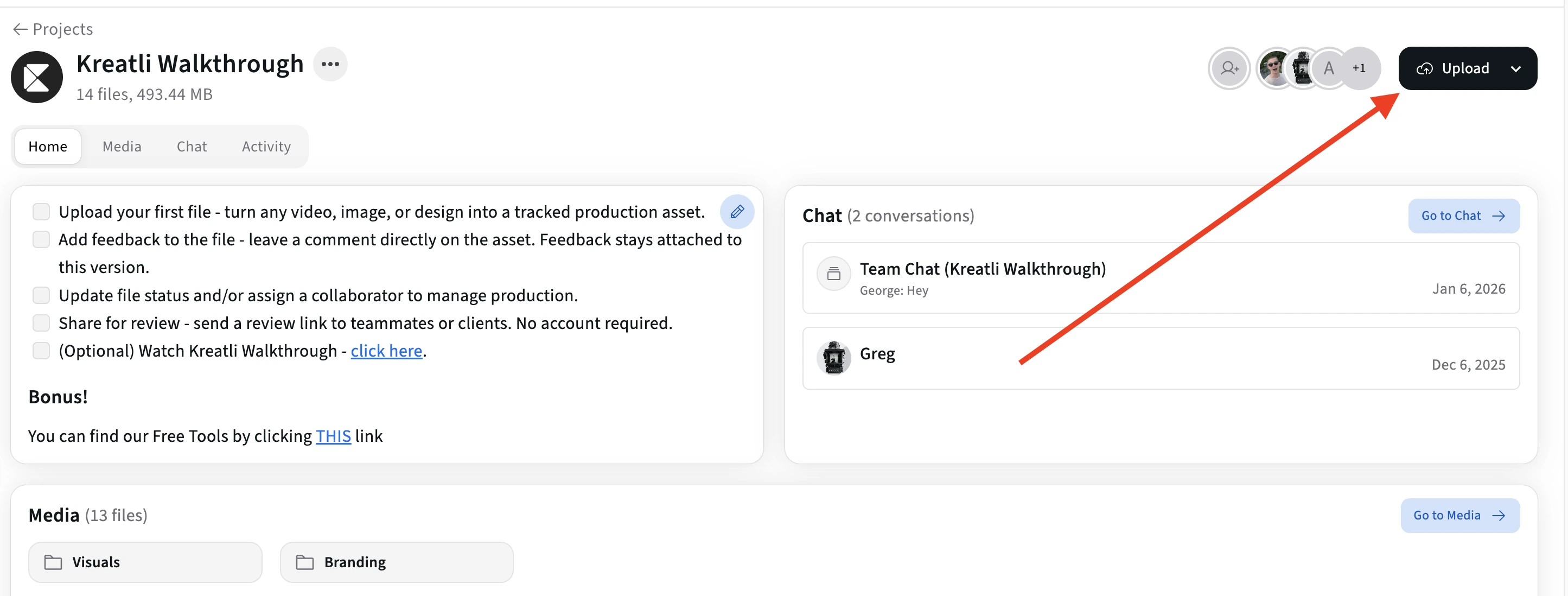
Upload your video in Kreatli
Sign in to Kreatli, open your project, and upload your video or add an existing asset. Your video is ready for frame-accurate review inside the same workflow.
Step 2
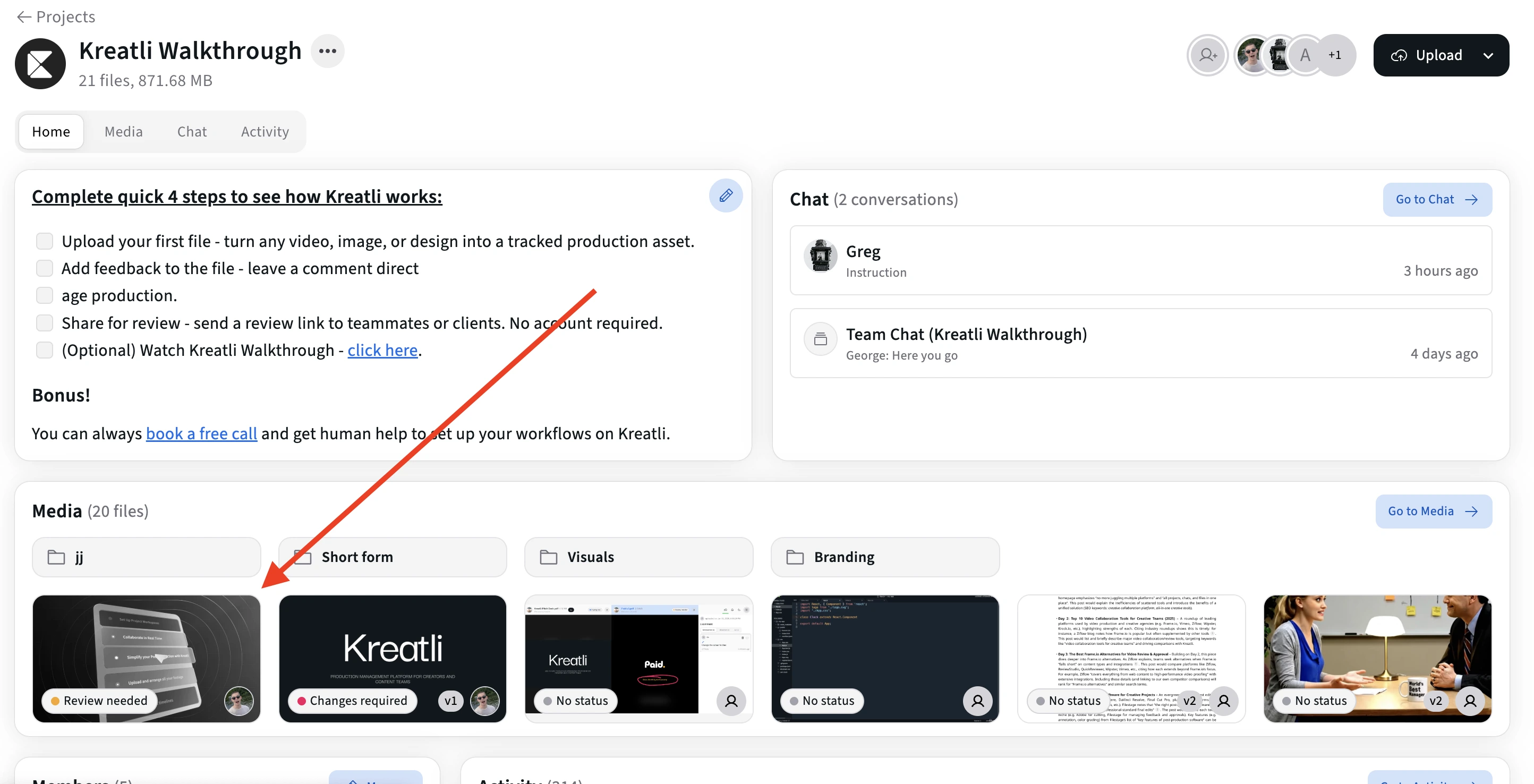
Open the video in the review player
Open the asset to enter the frame-accurate review view. The player lets you scrub to any frame and add comments at precise moments.
Step 3
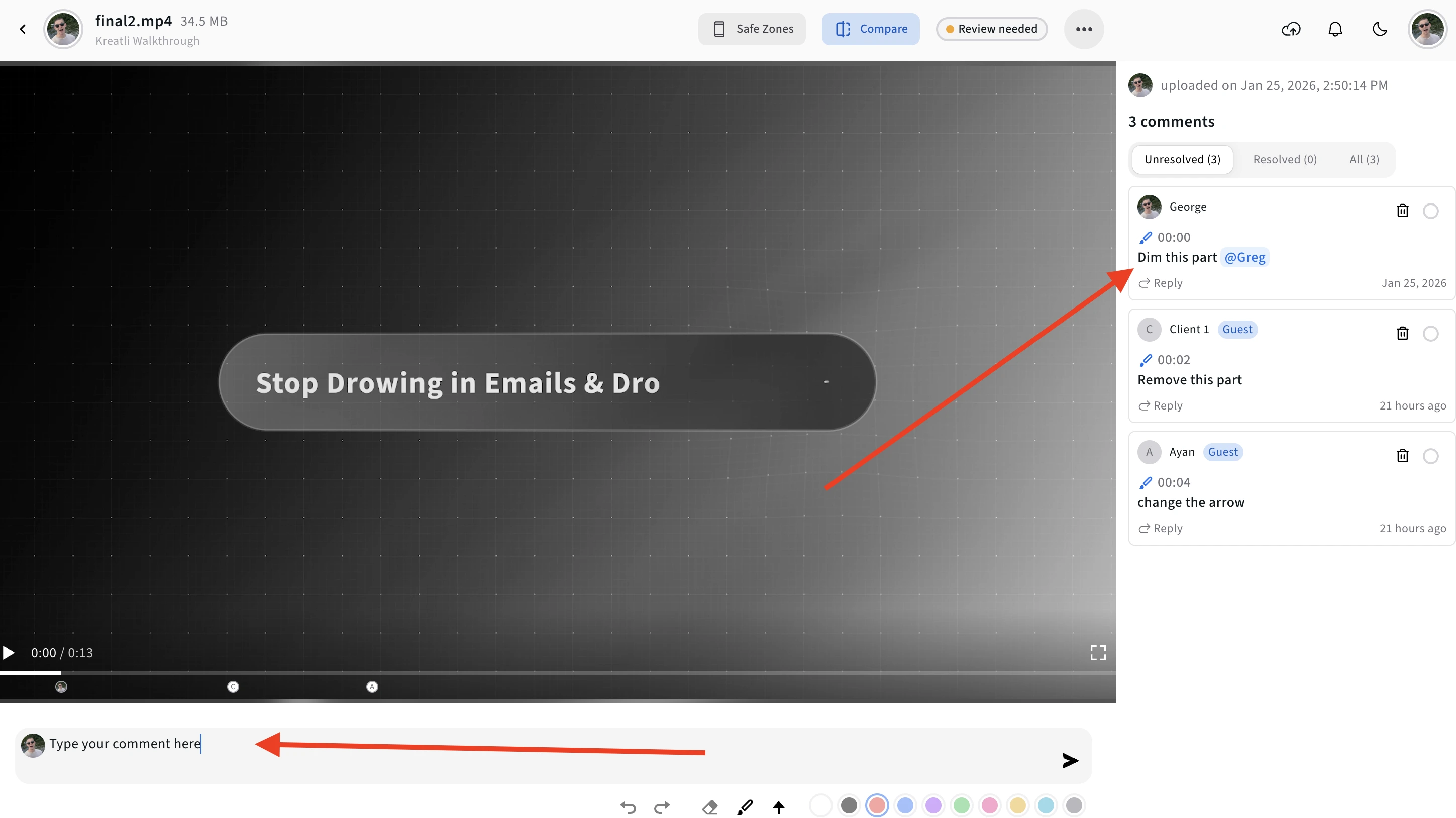
Add frame-accurate comments and annotations
Add comments, drawings, and shapes pinned to specific frames. Use text comments for feedback, draw on the frame to highlight areas, and use arrows or markers to point to elements.
Step 4
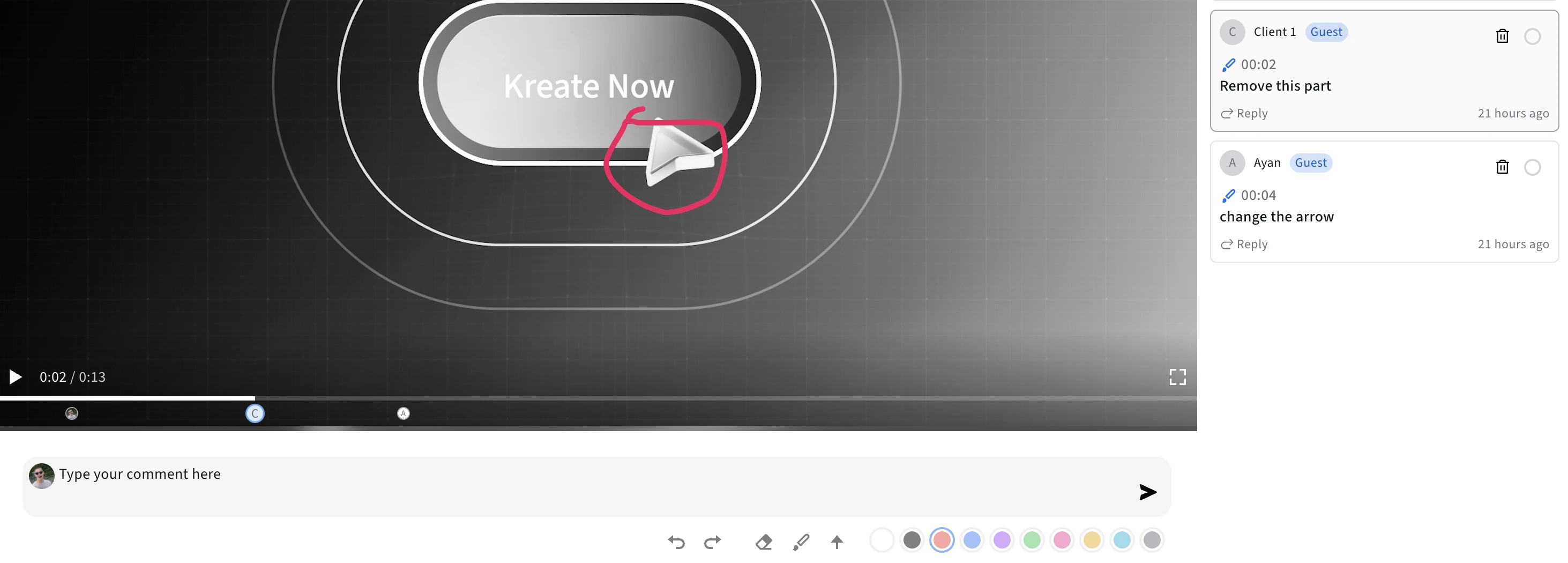
Use the timeline to review and jump to frames
See all comments on the timeline and jump to any frame to address feedback. Editors can navigate directly to annotated moments without guessing timestamps.
Step 5
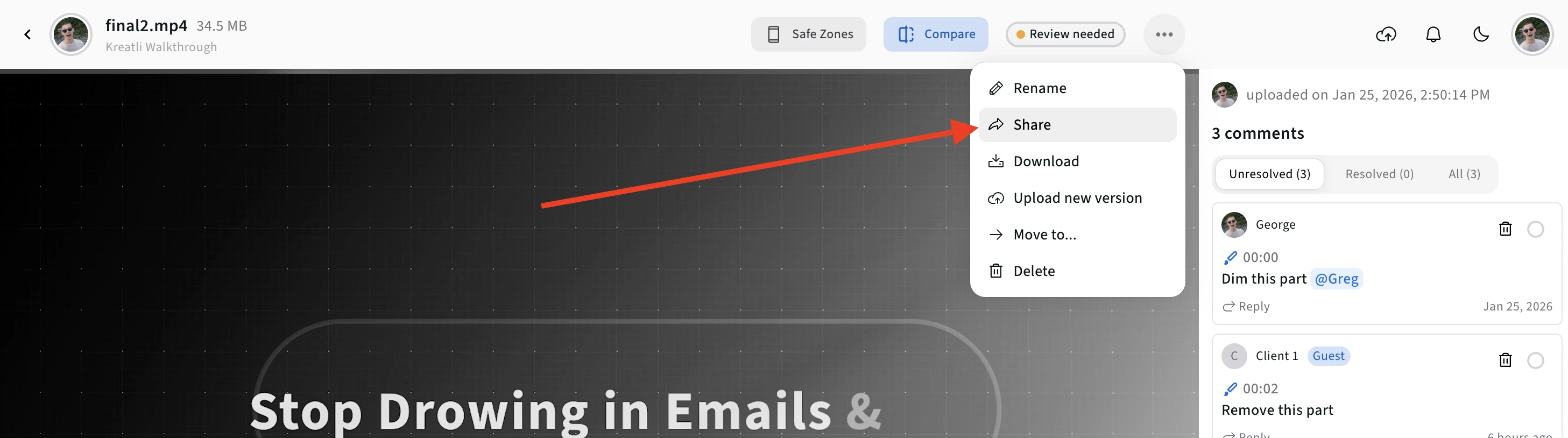
Share for approval or track resolution
Share a link with reviewers so they can comment without signing up. Mark comments as resolved as you address them, and keep everyone aligned on what's done and what's pending.
Read Our Complete Guide
Learn how to annotate video effectively to speed up feedback, reduce revisions, and improve collaboration.
Read Complete GuideHow Video Review Works
Use frame-accurate comments, drawings, and annotations to give precise feedback on your video.
Upload Your Video
Add your video to a Kreatli project. The file is stored securely with version history so you can track every cut and review round.
Frame-Accurate Comments
Pin comments to exact frames with timestamps. Every comment is linked to a specific frame number and moment in the video.
Drawings & Markup
Draw directly on video frames with freehand, shapes, and arrows. All markup stays pinned to the exact frame where you placed it.
Share for Review
Generate a secure review link and send it to clients or collaborators. They can review and comment without creating an account or downloading anything.
Multi-Reviewer Support
Multiple team members and clients can review the same video. See who added what with color coding and keep feedback in one thread.
Track Approvals
Mark comments as resolved, track who approved which version, and keep a clear record of what is done and what is pending across review rounds.
Related video features
Give video feedback, comment on video, or add drawings. Explore these options:
Why Review Videos in Kreatli
Review videos with precise, frame-accurate feedback so your team and clients stay aligned and revisions move faster.
Eliminate Ambiguity
Instead of vague descriptions, comments point to the exact frame. No more guessing or back-and-forth clarification about which moment needs changes.
Faster Revisions
Editors can jump directly to annotated frames, see visual markup, and make changes immediately. Resolution tracking ensures nothing gets missed.
Better Collaboration
Multiple reviewers can review simultaneously with visual feedback that everyone can see. Color coding helps organize feedback by reviewer or type.
Client-Friendly
Clients can review videos through no-signup guest links. They can draw, comment, and provide feedback without technical barriers or account creation.
Free Tools for Video Teams
Explore our collection of free tools designed to help video professionals work more efficiently.
Video Reviewer
Review videos online with frame-accurate comments, visual annotations, and approval workflows. Share with clients; recipients do not need a Kreatli account.
Learn more
Video Feedback Tool
Give frame-accurate feedback on videos with comments, annotations, and markup. Share review links with clients; recipients do not need a Kreatli account.
Learn more
Video Annotator
Add frame-accurate comments, drawings, and markup to video. Pin feedback to exact timestamps and share with clients; recipients do not need a Kreatli account.
Learn more
Video Proofing Tool
Proof videos with frame-accurate comments, annotations, and approvals. Share proofing links; recipients do not need a Kreatli account.
Learn more
See How This Works in Practice
Explore guides and comparisons that show how teams review videos and manage approvals in Kreatli.
Choose the Perfect Plan for Your Creative Journey
Sign up free — no credit card required. Upgrade to any plan when you're ready for full access.
Creator
$14per user
per month
per month
Designed for solo creators and teams who want to organize projects, review work, and create faster.
- Up to 3 members
- 500GB Storage
- Unlimited projects & reviewers
- Frame-accurate video review
- Shared asset libraries
Best Cost/Value Ratio
Team
$29per user
per month
per month
Built for established teams running multiple projects with shared assets, structured reviews, and consistent workflows.
- Everything in Creator
- Up to 10 members
- 2TB Storage
- File organization and management
- Versioning and comparison
- Asset-linked conversations
- Guest review links
- Comment threads and annotations
Enterprise
Custom
Tailored for enterprise organizations that need advanced controls, custom workflows, and dedicated support.
- Everything in Team
- Custom members
- Custom storage
- Single Sign-On (SSO)
- Dedicated Account Manager
- Custom Integrations & Features
Frequently Asked Questions
Get detailed answers about reviewing videos and approval workflows in Kreatli.
Still Have Questions?
If you did not find the answer you were looking for, contact our support team at support@kreatli.com to learn how Kreatli can help you review videos and streamline your approval workflow.
More Resources
Explore other Kreatli platform features to streamline your video review and collaboration workflow.
Review & Approval
Frame-accurate revisions and approvals for video content. Streamline your feedback workflow.
Learn more
Comment on Video
Comment on video with frame-accurate, timestamp-pinned feedback. Threaded discussions tied to exact frames.
Learn more
Video Annotation
Add frame-accurate annotations, drawings, and markup directly to video frames. Pin comments to exact timestamps and collaborate with precise visual feedback.
Learn more
How to review a video
Step-by-step video review for creative teams.
Learn more
Ready to Review Videos with Your Team?
Review videos with frame-accurate comments, drawings, and approvals in one place with your team and clients. Start using Kreatli today.