Host Video for Review
Hosting video for review means the file lives in a workspace with permissions, versions, and comments—not on a public CDN. Kreatli hosts cuts so you can revoke access and keep history. It is not a YouTube replacement for public publishing.
interview_v2.mp4
Vision review - Interviews
Share File
or
0/5 emails
What is a video hosting for review?
Hosting video for review means the file lives in a workspace with permissions, versions, and comments—not on a public CDN. Kreatli hosts cuts so you can revoke access and keep history. It is not a YouTube replacement for public publishing.
Use this page when you searched for video hosting for review. For video cloud storage, see video cloud storage. The cluster pillar is video review workflow. See Kreatli pricing or read how to share video.
How to Host Video in Kreatli
Follow these steps to host your video library in Kreatli—from upload and organization to secure sharing and long-term access.
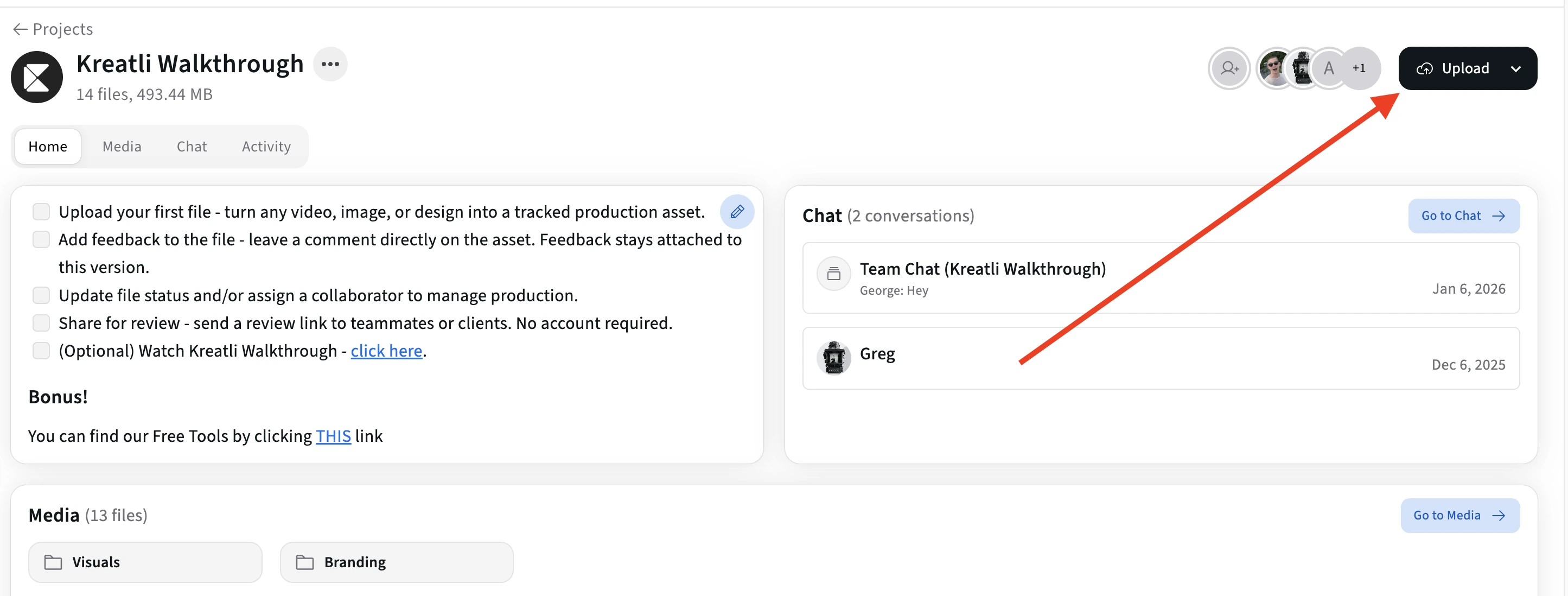
Step 1
Upload your video library to Kreatli
Sign in to Kreatli, create a project for your production work, and upload your videos. Each file is stored securely with version history so you can host current cuts and archives in one place instead of scattered drives or links.
Step 2
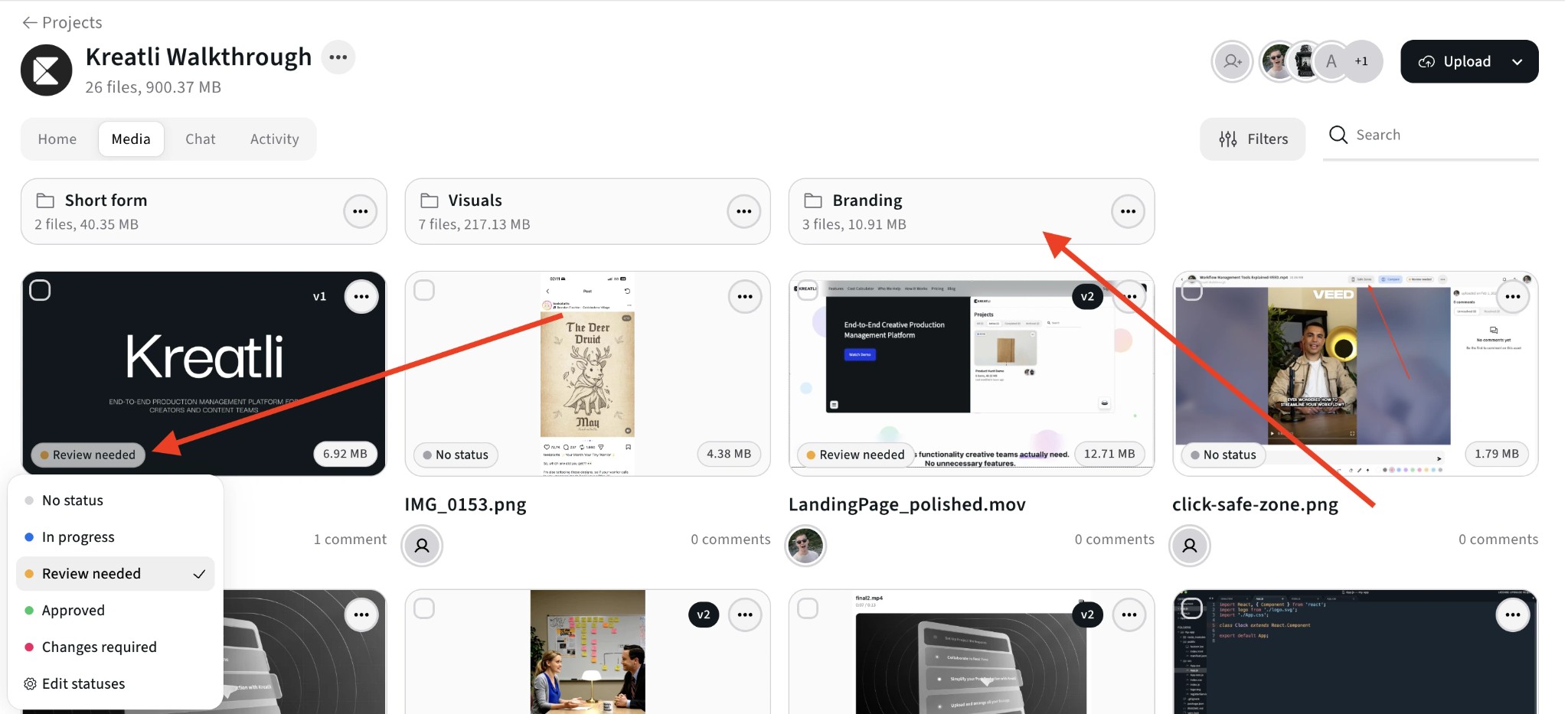
Organize hosted videos with folders and status
Use folders, subfolders, and status labels to organize raw footage, edits, exports, and client-ready cuts. Keep your hosted video library structured so teammates and clients can always find the right version without searching through drives.
Step 3
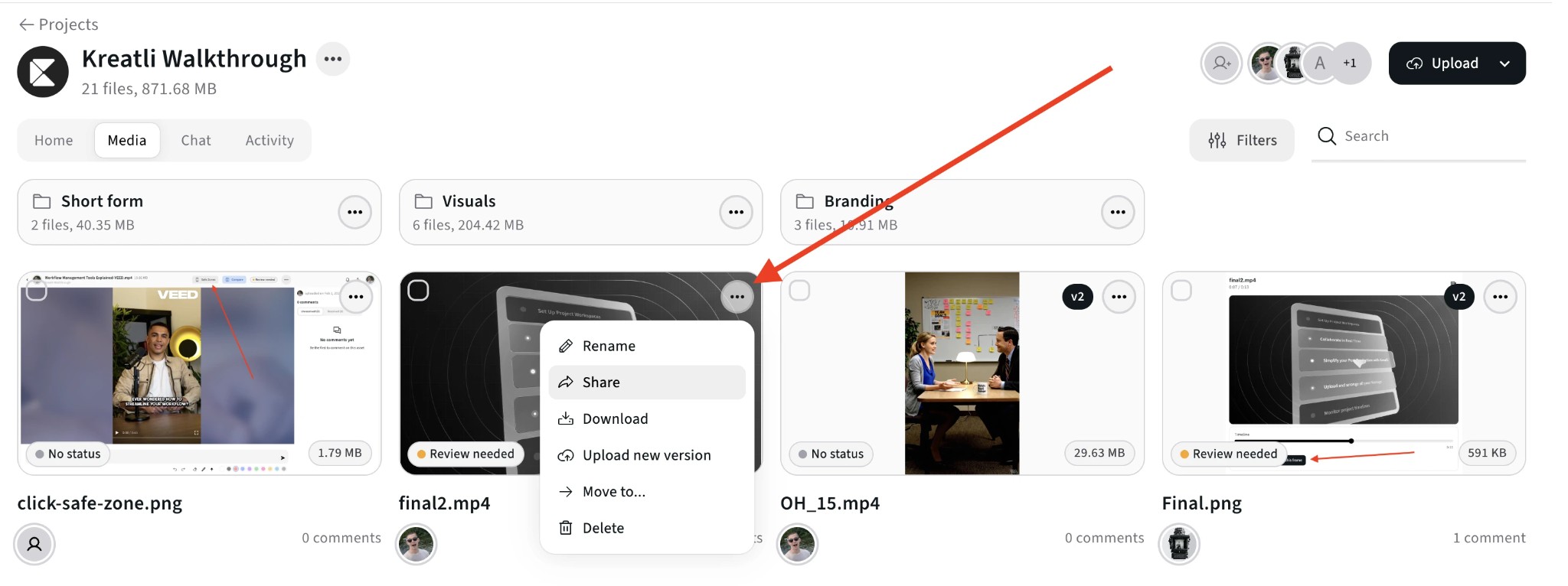
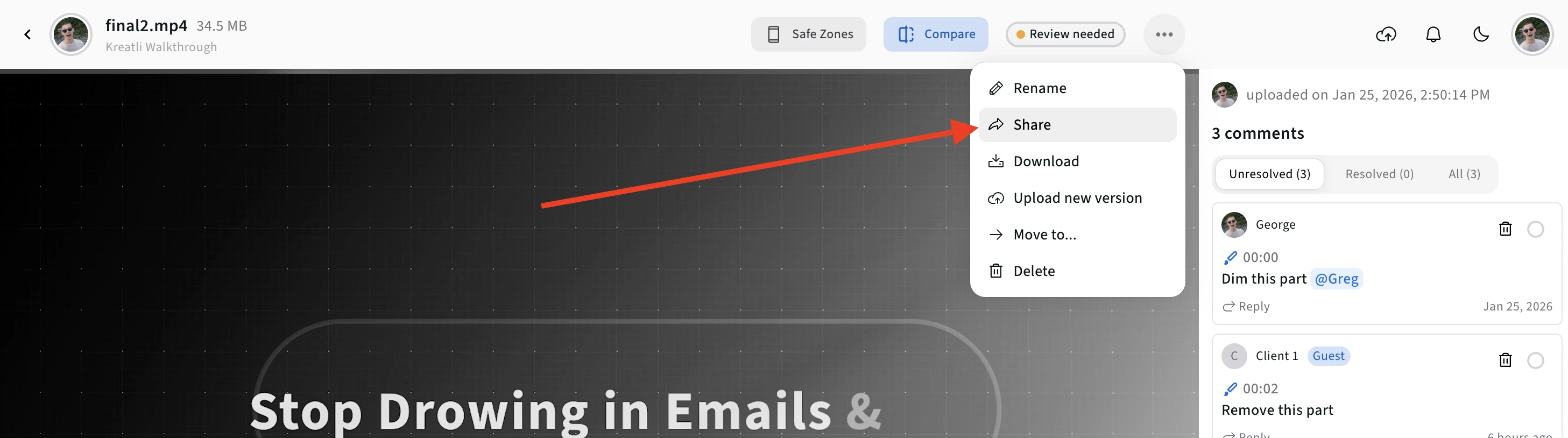
Set access and share hosting links
Decide who can view, comment, or approve each hosted video. Generate secure review links for clients and stakeholders so they can watch in the browser while you stay in control of access, permissions, and link visibility.
Step 4
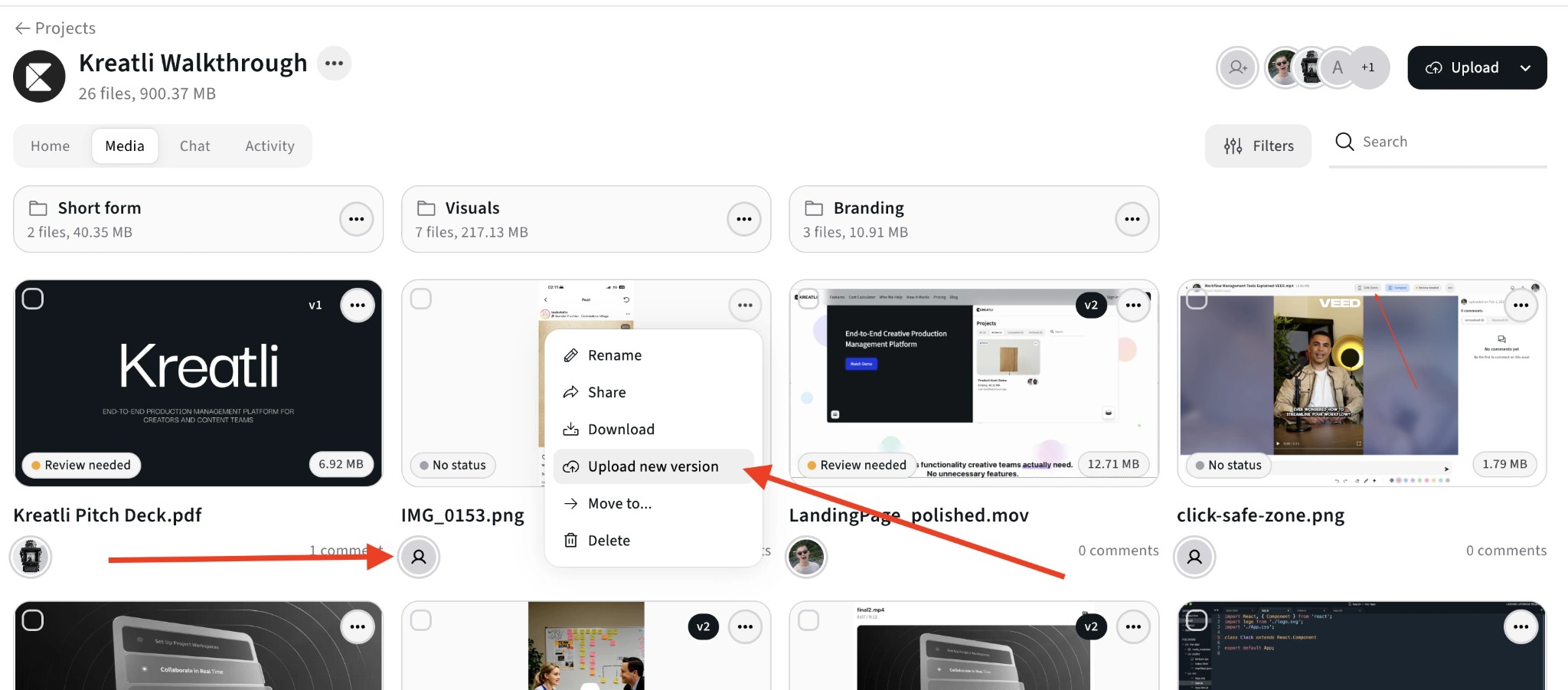
Collect feedback and keep versions in sync
Invite reviewers to leave frame-accurate comments and annotations on hosted videos. Upload new versions while keeping all feedback, approvals, and history tied to the same hosted asset so your library stays clean and accurate.
Step 5
Use Kreatli as your long-term video hub
Keep finished campaigns and evergreen content hosted in Kreatli for future reuse. Search, filter, and reshare hosted videos with new stakeholders without re-uploading files or losing track of where assets live.
Read Our Complete Guide
See how teams use Kreatli to host, review, and approve video with frame-accurate feedback across production workflows.
Read Complete GuideTurn Kreatli Into Your Hosted Video Hub
Host active projects and archives in Kreatli so every video, version, and approval lives in one secure place instead of scattered across tools.
Organize by Client or Campaign
Group hosted videos by client, show, or campaign. Keep rough cuts, revisions, and final exports in one structured workspace instead of buried in folders and drives.
Control Who Sees What
Host video assets with clear permissions. Decide who can view, comment, or approve each file so stakeholders only see what is relevant to them.
Streamlined Review on Hosted Video
Every hosted video opens in a frame-accurate review player. Reviewers can leave comments, drawings, and approvals directly on the hosted asset without downloading files.
Keep a Long-Term Record
Hosted videos keep their version history and approval trail. Months later, you can still see which cut was approved and reuse assets without starting over.
Host Video Instead of Chasing Download Links
Replace expiring transfers and inbox searches with a hosted video workspace where files, feedback, and approvals stay connected.
Upload Once, Reuse Often
Host a video once and reuse it across campaigns, channels, and stakeholders. Generate new review links from the same hosted asset instead of re-uploading the same file to multiple tools.
Know Which Version Was Approved
Because reviews happen on hosted assets, you can always see which version received sign-off. Version history and approvals stay attached to the file—not hidden in separate links or email threads.
Free Tools for Video Teams
Explore free tools that support video hosting workflows—frame-accurate review, feedback, and data transfer planning.
Video Manager
Organize, store, and track video assets with version control and client share links. Manage feedback and approvals in one workspace.
Learn more
Video Reviewer
Review videos online with frame-accurate comments, visual annotations, and approval workflows. Share with clients; recipients do not need a Kreatli account.
Learn more
Video Feedback Tool
Give frame-accurate feedback on videos with comments, annotations, and markup. Share review links with clients; recipients do not need a Kreatli account.
Learn more
Data Transfer Calculator
Calculate how long it takes to upload or download large files. Perfect for video editors and post-production teams.
Learn more
See How Teams Host Video in Practice
Explore guides and comparisons that show how creative teams host, review, and approve video in Kreatli.
Choose the Perfect Plan for Your Creative Journey
Sign up free — no credit card required. Upgrade to any plan when you're ready for full access.
Creator
$14per user
per month
per month
Designed for solo creators and teams who want to organize projects, review work, and create faster.
- Up to 3 members
- 500GB Storage
- Unlimited projects & reviewers
- Frame-accurate video review
- Shared asset libraries
Best Cost/Value Ratio
Team
$29per user
per month
per month
Built for established teams running multiple projects with shared assets, structured reviews, and consistent workflows.
- Everything in Creator
- Up to 10 members
- 2TB Storage
- File organization and management
- Versioning and comparison
- Asset-linked conversations
- Guest review links
- Comment threads and annotations
Enterprise
Custom
Tailored for enterprise organizations that need advanced controls, custom workflows, and dedicated support.
- Everything in Team
- Custom members
- Custom storage
- Single Sign-On (SSO)
- Dedicated Account Manager
- Custom Integrations & Features
Frequently Asked Questions
Get detailed answers about hosting video in Kreatli and how it fits into your review and approval workflows.
Still Have Questions?
If you did not find the answer you were looking for, reach out to our team at support@kreatli.com to learn how hosting video in Kreatli can support your specific production workflow.
More Resources
Explore other Kreatli platform features that help you manage hosted videos, collect precise feedback, and keep approvals organized.
Secure Asset Storage
Enterprise-grade storage for creative assets. Organize files, track versions, and protect your media with reliable infrastructure.
Learn more
Creative Workspace
Unified workspace for creative production. Organize assets, manage projects, and collaborate with your team.
Learn more
Review & Approval
Frame-accurate revisions and approvals for video content. Streamline your feedback workflow.
Learn more
Video Annotation
Add frame-accurate annotations, drawings, and markup directly to video frames. Pin comments to exact timestamps and collaborate with precise visual feedback.
Learn more
Ready to Host Video in One Place?
Use Kreatli to host your video library, control access, and collect frame-accurate feedback and approvals—all in one secure workspace.